Best NVMe SSD for Gaming in 2026 (PCIe 5.0 vs 4.0: Is It Worth It?)
Some links in this guide are affiliate links - we may earn a commission at no extra cost to you.
Storage is the one part of a gaming build where the marketing has completely lapped the reality. SSD makers love to wave around "14,000 MB/s!" numbers, and they are real - but they answer a question almost no gamer is actually asking. The truth nobody selling a Gen5 drive wants to say out loud is that games do not load meaningfully faster on PCIe 5.0. The leap that mattered already happened years ago, when you went from a hard drive or a SATA SSD to any NVMe drive at all. Everything past that is diminishing returns.
The pitch for Gen5 was always DirectStorage, the tech that lets the GPU pull assets straight off the SSD and decompress them without the CPU in the middle. It is real, it works, and a growing handful of games support it - but it is still niche in 2026, and even in the titles that use it, the gap from a fast Gen4 drive to a Gen5 drive is small. You are paying a premium and adding heat to chase a benefit you will struggle to feel.
And the timing could not be worse to overpay. The 2026 NAND crisis that wrecked RAM pricing hit storage just as hard - 2TB drives that sat near $100-130 a couple of years ago now run around $300, and the premium models push past $400. Those numbers moved again between our June and August passes, and they moved the wrong way. When every gigabyte costs more, spending extra on sequential speed you will never notice is exactly the wrong move. The smart play in this market is a good, cool-running Gen4 drive at the capacity you will actually use, and putting the rest of the budget where frames actually come from.
How we rank: we weigh real-world game load behavior over sequential-benchmark headlines, favor TLC NAND and honest sustained-write performance, and track street prices so the numbers here reflect what drives cost in the 2026 NAND crunch - not launch-day MSRP.
The short version: for a 2026 gaming build, a quality 2TB PCIe 4.0 TLC drive is the sweet spot, and the WD Black SN850X 2TB at ~$375-400 is the one most people should buy - fast DRAM-backed TLC for barely more than a budget drive. If money is tight, the Crucial P310 2TB at ~$225 loads games just as quickly as anything you will notice. Gen5 is a waste for gaming: more money, more heat, no frames. The full reasoning is below.
SSD prices for gaming, August 2026
The three families worth buying right now, at 2TB. Free to cite with a link to bottleneckpc.com.
| Drive (2TB) | Tier | Street price | Best for |
|---|---|---|---|
| Crucial P310 | Best value | ~$225 | Cheapest way into a fast Gen4 gaming drive |
| WD Black SN850X | Best overall | ~$375-400 | The all-rounder most gamers should buy |
| Samsung 990 Pro | Premium | ~$420 | Endurance and top random reads if you want the best |
All three are PCIe 4.0 TLC drives, and that is deliberate - for gaming, Gen4 TLC is the tier that matters. The spread here is almost entirely about the memory crisis tax on the premium end, not about which drive loads your games faster.
Best value: Crucial P310 2TB
The P310 is the honest budget answer, and it makes a point worth sitting with: a DRAM-less Gen4 drive loads games essentially as fast as a drive costing far more. Game loading is dominated by random reads of thousands of small assets and CPU-side decompression, and on that workload the P310 keeps pace with anything you will actually perceive. It runs cool enough to live under your motherboard's built-in M.2 heatsink with no drama, and its TLC NAND means it will not fall off a cliff the way a cheap QLC drive does.
The tradeoff is real but narrow. Being DRAM-less, it leans on a slice of system RAM (HMB) instead of dedicated cache, so under long sustained writes - think moving hundreds of gigabytes at once, or heavy content work - it slows down more than a DRAM drive would. For a gaming and boot drive, where writes are bursty and reads dominate, you will basically never touch that ceiling. If your goal is the most usable capacity per dollar in a build that plays games, this is where the money stops working harder for you.
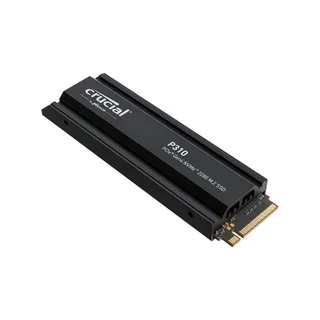
Best value
Crucial P310 2TB
The cheapest way into fast 2TB Gen4 TLC - loads games as quickly as anything you will notice.
Best overall: WD Black SN850X 2TB
If you want to buy one drive and stop thinking about it, this is the pick, and it is the one we drop into most builds. The SN850X is a mature, DRAM-backed TLC Gen4 drive with a long track record as a gaming default, and the reason it wins is the price gap that no longer exists. It costs only a hair more than the budget value drive, and for that hair you get a proper DRAM cache that holds performance steady under sustained writes and heavy multitasking - the exact scenarios where a DRAM-less drive starts to sag.
In everyday gaming, will you feel the difference against the P310 loading a level? Honestly, no - the real-world game load-time gap between two good Gen4 drives is fraction-of-a-second territory. What you are buying is consistency and headroom: a drive that stays fast when you are installing a 150GB game while a download runs in the background, backed by a 5-year warranty and a healthy TBW endurance rating that signals WD trusts the NAND. When the step up from "best value" to "best overall" is this small, the all-rounder is the easy call. Skip the pricier heatsink SKU unless your board lacks an M.2 heatsink - the bare drive is all a gamer needs.
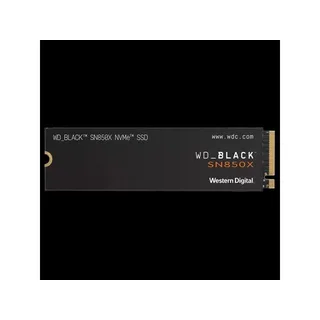
Best overall
WD Black SN850X 2TB
The all-around best gaming SSD - fast DRAM-backed TLC for barely more than the value pick.
Premium pick: Samsung 990 Pro 2TB
The 990 Pro is the drive for buyers who simply want the best Gen4 SSD and are willing to pay the crisis-inflated premium for it. It posts the highest random-read speeds of this trio, carries a strong endurance rating, and Samsung's Magician monitoring software is the best in the business for keeping an eye on health and firmware. It is a genuinely excellent drive - nobody who buys one is making a mistake, exactly.
The value math here has genuinely shifted since our June pass, and it shifted in the 990 Pro's favor. The premium over the SN850X used to be about 70%, which made it easy to wave off. At ~$420 against ~$375-400 the gap has narrowed to a sliver - still a premium, but no longer the kind that settles the argument on its own. What has not changed is what that money buys you: game loading is not bound by the sequential and random-read peaks where the 990 Pro pulls ahead, so the extra speed shows up in synthetic benchmarks and heavy professional work, not in launching Cyberpunk.
One practical wrinkle worth knowing before you shop: the bare 2TB 990 Pro has largely vanished from retail shelves, and what is actually in stock is the heatsink SKU. If your motherboard already has an M.2 heatsink you are paying for a part you will take straight back off. Buy this drive if you value the endurance headroom, Samsung's monitoring software, and the reassurance of owning the top drive, or if the same PC does serious creative work between gaming sessions. For a pure gaming build the SN850X is still the smarter buy.
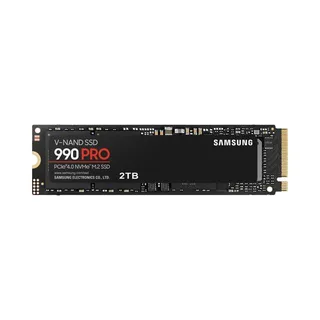
Premium pick
Samsung 990 Pro 2TB
Samsung's top Gen4 drive for buyers who want the best random reads and endurance, crisis premium and all.
PCIe 5.0 vs PCIe 4.0 for gaming: the confident call
Here is the call, without hedging: for a gaming PC in 2026, PCIe 5.0 is wasted money and wasted heat. The benchmark numbers are real - Gen5 drives roughly double the sequential read ceiling of Gen4 - but that number describes moving one giant contiguous file, which is not what happens when a game loads. A level load is thousands of small random reads plus CPU decompression, and on that work a Gen4 and a Gen5 drive land within a fraction of a second of each other. You are paying more for a spec the game never leans on.
| PCIe 4.0 | PCIe 5.0 | |
|---|---|---|
| Sequential read | ~7,000 MB/s | ~12,000-14,000 MB/s |
| Real game load time | Basically identical | A fraction of a second faster, if that |
| Heat / throttling | Cool, mobo heatsink fine | Runs hot, needs big heatsink |
| Price per TB | Lower | Notably higher |
| Worth it for gaming? | Yes | Not really |
There is a genuine case for Gen5, and it is not gaming - it is heavy content creation: editing high-resolution video, shuffling massive project files daily, or running workloads that actually saturate sequential bandwidth. If that is you, a Gen5 drive earns its keep and its heatsink. For everyone whose PC exists to play games, a good Gen4 drive is the right call.
What to skip: the DRAM-less QLC bargain drives that flood the low end. QLC (quad-level cell) NAND is cheaper up front, but it slows to a crawl once its small fast cache fills mid-write, and it wears out sooner than TLC. Pair that with no DRAM and you get a drive that feels fine in a benchmark and frustrating the moment you copy a big game library onto it. QLC is only ever acceptable as cheap bulk secondary storage - your main gaming and boot drive should be TLC, every time. Speed class on the box is the loud number, but TLC-over-QLC is the spec that actually protects the way your PC feels a year from now.
How much storage you actually need
This is where your money should go, not into sequential speed. Games have gotten enormous - a single modern AAA title routinely runs 100-150GB, and some push past 200GB. 500GB is a non-starter that leaves room for two or three games after Windows. 1TB is the realistic floor if you keep only a few games installed at once. 2TB is the sweet spot, with room for a healthy library and usually a better price per gigabyte than 1TB - it is what we put in most builds. 4TB is for big libraries and creators, worth it only when the price per TB stays reasonable. If you are ever choosing between a 1TB Gen5 drive and a 2TB Gen4 drive at the same price, take the 2TB Gen4 every single time - double the capacity you will use beats sequential speed you will not notice.
The bottom line
Storage is not where your gaming performance lives, and 2026's inflated NAND prices make it more important than ever not to overspend chasing a number. Get a quality 2TB PCIe 4.0 TLC drive and you are done: it loads games as fast as anything you will perceive, runs cool on your board's built-in heatsink, and leaves budget for the CPU and GPU that actually set your frame rate. For most people that drive is the WD Black SN850X; on a tighter budget the Crucial P310 gives up almost nothing that matters; and the Samsung 990 Pro is there if you want the best and will pay the premium. Skip Gen5 unless you move huge files for a living, skip DRAM-less QLC entirely for a primary drive, and put the money you saved where the frames are. Get the SSD right once, then forget about it and go play something.
Not sure your CPU and GPU are balanced once the storage is sorted? Run your build through the Bottleneck Calculator, and if you are starting from scratch, our pre-built configurations pair the right storage, power supply, and components for every budget.
Related reading
- RAM and SSD prices in 2026: buy now or wait? - the NAND crisis in full, with the numbers
- The 2026 RAM shortage explained - why storage and memory both spiked
- Best GPU to buy in 2026 - where your build budget actually earns frames
- What PSU do I need? - sizing the rest of the build
- How to build a budget gaming PC - a full parts list that spends where it counts
Found this useful? Pass it along:
Frequently Asked Questions
Is a PCIe 5.0 SSD worth it for gaming?
For pure gaming, no. PCIe 5.0 drives post huge sequential benchmark numbers, but games load almost identically to a good PCIe 4.0 drive - usually a fraction of a second apart. The bottleneck for game loading is random read speed and decompression, not raw sequential throughput. Save the money and put it toward more capacity or a better GPU.
How much SSD storage do I need for gaming in 2026?
1TB is the realistic minimum, but 2TB is the sweet spot. Modern AAA games routinely take 100-150GB each, and a 1TB drive fills up after about five or six installs once you account for Windows. 2TB gives you breathing room and usually costs only a bit more per gigabyte.
What is the difference between DRAM and DRAM-less SSDs?
DRAM-less drives use a small slice of your system RAM (HMB) as a cache instead of dedicated memory on the SSD. They are cheaper and fine for a boot drive or game storage, but DRAM-equipped drives hold up better under sustained writes and heavy multitasking. For a primary gaming drive, DRAM is nice to have but not essential.
Do I need a heatsink on my NVMe SSD?
For PCIe 4.0 drives, usually not - most motherboards include an M.2 heatsink that is plenty. For PCIe 5.0 drives, yes, they run hot and can thermal throttle without one. Many Gen5 drives now ship with a heatsink or even a tiny fan, which is another reason they are overkill for most gamers.
Is QLC or TLC better for a gaming SSD?
TLC. It is faster and far more durable than QLC, which slows down dramatically once its cache fills during large writes. QLC is acceptable for a cheap secondary storage drive, but your main gaming and boot drive should be TLC.