What PSU Do I Need? PSU Wattage Guide for Every GPU (2026)
Some links in this guide are affiliate links - we may earn a commission at no extra cost to you.
Most people get PSU sizing exactly backwards. They spend an hour arguing about whether 750W is "enough" for a mid-range card that will never sniff 500W, then buy a no-name unit to save twenty dollars. The wattage is the easy part, and for the vast majority of builds you are more likely to overbuy it than undersize it. The one place that instinct flips is the top of the stack: an RTX 5090 pulls real power and spikes hard, and undersizing it is how you get random shutdowns mid-game or, worse, a stressed connector. This guide covers how to size a supply correctly, why headroom exists, and why the label on the unit matters as much as the number.
How to estimate your real power draw
Your total draw is basically your two hungriest parts plus a fixed handful of small stuff:
CPU TDP + GPU TDP + ~90W (motherboard, RAM, SSD, cooler, fans) = total draw
That 90W covers the rest of a normal build. Add-in cards, a wall of RGB, or a dozen drives push it higher, but for a standard gaming PC it is close enough. The mistake to avoid is sizing a supply to that raw draw number. A PSU should not run pinned at 100% of its rating. It is happiest, quietest, and longest-lived loafing at somewhere between 50 and 80 percent load, so you take the total and add roughly 25 percent, then round up to the nearest real PSU size. Our PSU Calculator does exactly this math per component, including your specific drives and fans, and hands you a minimum and a recommended size in one click.
The transient-spike reality on RTX 50
Headroom is not just about efficiency. The bigger reason is transient spikes. A modern GPU does not draw a steady, predictable wattage. Its rated TDP is an average, and for a few milliseconds when a scene loads or a shader compiles it can briefly pull well above that figure. NVIDIA's 40 and 50 series are notorious for this: a card rated at 300W can momentarily demand meaningfully more, and the top-end cards spike hardest of all.
A supply sized with zero headroom sees that microsecond spike, reads it as an overload, trips its over-current protection, and cuts power. The result is a PC that runs fine on the desktop and reboots the instant a game starts loading a demanding scene. It looks like a mysterious crash and it is really just a PSU with no slack. The 25 percent buffer exists to swallow those spikes without the unit noticing. This is also why a genuinely good 650W supply can be steadier under a spiky load than a mediocre 850W one, which brings us to quality.
80+ efficiency tiers, decoded
The 80 Plus badge (Bronze, Gold, Platinum, Titanium) rates how much wall power the unit turns into usable DC power instead of waste heat. The higher tiers are more efficient, but the difference on your power bill is small. Gold sits around 90 percent efficient and is the value sweet spot for a gaming PC. Platinum and Titanium cost more for a couple of efficiency points that most people will never notice on the meter.
The more useful thing the badge tells you is a rough proxy for build quality. A reputable maker does not slap a Gold rating on garbage internals, so a Gold unit from a known brand generally uses better capacitors and more complete protection circuitry than a bargain-bin Bronze one. Treat the tier as a floor, not the whole decision. Aim for 80 Plus Gold and then judge the actual unit and brand.
ATX 3.1 and the 12V-2x6 connector
If you are buying a supply for a current GPU, look for ATX 3.1 and PCIe 5.1 on the box. This gets you the native 12V-2x6 power connector and, just as importantly, a unit designed to the newer spec's tighter rules for handling exactly the transient spikes described above. You skip the ugly adapter dongle and you get a supply engineered around how modern cards actually behave.
The 12V-2x6 is the revised version of the 16-pin connector that had a well-publicized melting problem on high-end 40 and 50 series cards. The connector standard is only part of the fix, though. Seating, cable quality, and load all matter, and the problem has shown up even on first-party cables and power-limited cards. If you are running an RTX 5090 or 5080, read our full 12VHPWR safety guide before you build. It covers why it happens, the 60-second checklist that removes the known triggers, and the specific native 12V-2x6 units worth buying.
Why quality beats watts
Wattage is half the decision. Whether the unit is actually good is the other half, and it is where people get burned.
The power supply is the one component that can take the rest of your build down with it if it fails badly, so it is not where you cut corners. A 650W unit from a top-tier maker will outperform and outlast an 850W no-name every time, because the number on the label says nothing about the capacitors, the protections, or how the unit behaves when a GPU spikes. Buy fully modular if you can, since plugging in only the cables you use makes for a cleaner build and better airflow. And favor a reputable brand over a bigger number on a cheaper box. You can shop 80+ Gold units on Amazon or on Newegg once you know your target wattage.
Recommended wattage by GPU tier (2026)
Here is the sizing target for every current GPU, built on the formula above. The numbers assume a typical gaming CPU pulling around 105W (think Ryzen 7 9700X, Core Ultra 7, or an i5-14600K) plus the usual handful of drives and fans. If you run a power-hungry chip like a Core i7-14700K, or you have a dozen drives and an AIO, bump up one tier. Free to cite with a link to bottleneckpc.com.
| GPU | GPU TDP | Bare Minimum | Recommended |
|---|---|---|---|
| RTX 5090 | 575W | 850W | 1000W |
| RTX 5080 | 360W | 550W | 750W |
| RTX 5070 Ti | 300W | 550W | 650W |
| RTX 5070 | 250W | 450W | 550W |
| RTX 5060 Ti | 180W | 450W | 550W |
| RTX 5060 | 150W | 450W | 550W |
| RX 7900 XTX | 355W | 550W | 750W |
| RX 9070 XT | 300W | 550W | 650W |
| RX 9070 | 250W | 450W | 550W |
| RX 9060 XT | 200W | 450W | 550W |
Notice how forgiving the mid-range is. Everything from an RTX 5060 up to an RX 9070 lives comfortably on a 550W to 650W unit, and a quality 650W 80+ Gold supply covers that entire band with upgrade room to spare. You do not need a 1000W monster unless you are feeding an RTX 5090, and buying one for a 5070 build just spends money you could put toward the card.
The bottom of the chart deserves one honest note. The math says a 5060 build technically clears on 450W, and you can run it there, but 450W units are rare and often low quality with zero upgrade room. A solid 550W 80+ Gold unit costs almost the same and is the smarter floor. At the other end, a 5090 wants a genuine 1000W supply, and that is the one build where you should not talk yourself down a tier.
Want the exact number for your specific parts, drives and fans included? Run them through the PSU Calculator. It breaks down every component's draw and returns the minimum and recommended size, so you are sizing to your real build instead of a rule of thumb. If you are still choosing parts, our pre-built configurations already pair a correctly sized, quality PSU with every GPU tier, and the Bottleneck Calculator will tell you whether your CPU and GPU are balanced before you spend anything.
Three units that cover the whole chart
Rules of thumb are only useful if they end in a purchase you don't regret, so here are the three supplies we'd actually put in builds today - one per band of that table, all 80+ Gold, all from our live parts feed. Prices move; treat every figure as approximate.
The 550-650W band (RTX 5060 to RX 9070)
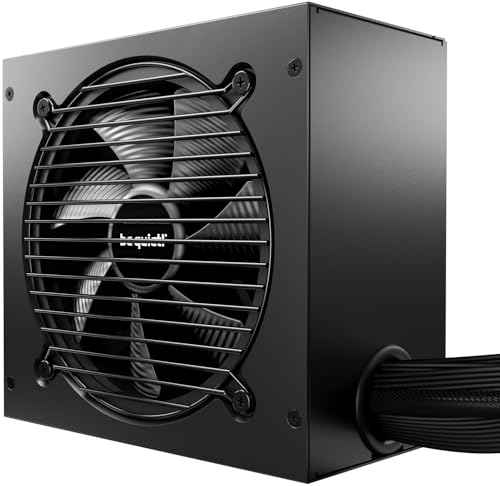
be quiet! Pure 12 650W - 80+ Gold, ATX 3.1
Covers everything from an RTX 5060 up to an RX 9070 with room to spare, and it's a current ATX 3.1 design with the native 12V-2x6 connector - so a future GPU upgrade plugs straight in instead of hanging off adapters. Check the 850W below before you buy it, though - right now it costs less. Stock on this one has been spotty lately - if it is not listed, the MSI MAG A650GL at ~$77 covers the same slot.
The 750-850W band (RTX 5070 Ti / 5080 / RX 9070 XT)
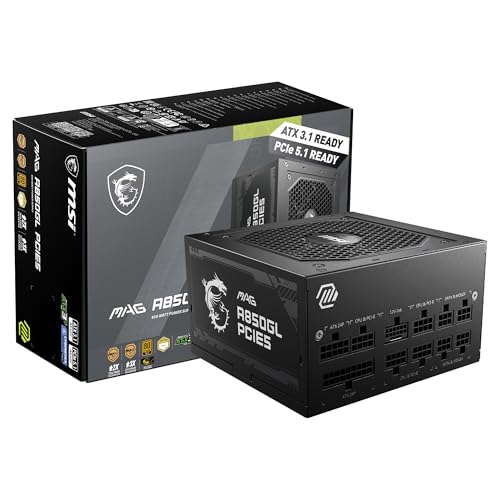
MSI MAG A850GL - 850W, 80+ Gold, ATX 3.1, fully modular
The sweet-spot buy of the whole guide: enough for any current card short of a 5090, fully modular, ATX 3.1, and as of this month it is actually cheaper than the 650W unit above it - which is why we default to it in our own build lists.
The 1000W tier (RTX 5090)
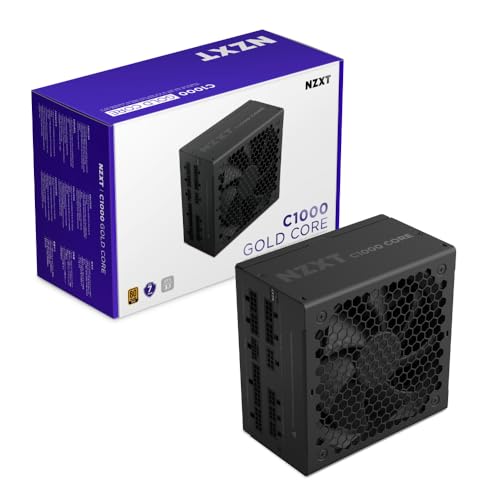
NZXT C1000 Core - 1000W, 80+ Gold, ATX 3.1
The one build where you buy the big unit is the 5090, and this is the rare 1000W ATX 3.1 supply that stays under $200 while most of the tier drifts past it. Native 16-pin cable, no adapter chain - which matters more on this card than any other.
The bottom line
Sizing a PSU comes down to one honest sentence: add your CPU and GPU TDP, add about 90W, multiply by 1.25, round up to a real size, and buy that wattage from a reputable maker at 80+ Gold. For most 2026 gaming builds that lands on a quality 650W or 750W unit, and it will carry you through a GPU upgrade or two. Overbuying by a tier costs a little and hurts nothing. Undersizing a spiky top-end card costs you stability and, at the very top, invites connector trouble. Size it once, size it right at the quality level, and you never have to think about it again.
Related reading
- RTX 5090 connector safety guide - why the 16-pin melts and the checklist that prevents it
- Build a PC - full parts lists with a correctly sized PSU at every budget
Found this useful? Pass it along:
Frequently Asked Questions
How many watts does my gaming PC need?
For most 2026 gaming builds, a quality 650W to 850W power supply covers you. The exact number depends on your GPU - an RTX 5060 or RX 9060 is happy on 550W, an RTX 5070 or RX 9070 wants 550-650W, and an RTX 5090 needs a 1000W unit. Add up your CPU TDP plus GPU TDP, add about 90W for everything else, then add 25% headroom.
Is it bad to buy a PSU that is too powerful?
No. A bigger PSU does not push extra power into your parts - it only delivers what they draw. A 850W unit running a 500W system just runs cooler, quieter, and more efficiently, and it leaves you room to upgrade your GPU later. The only downside is spending a bit more upfront.
What happens if my PSU is too small?
An undersized PSU causes random shutdowns, crashes, and reboots, usually right when you load a game and the GPU spikes. Modern GPUs can briefly pull 2-3x their rated wattage for a few milliseconds, and a too-small PSU trips its protection and cuts power. In rare cases it can damage components.
Does 80+ Gold actually matter?
Yes, but mostly for quality, not your power bill. 80+ Gold means roughly 90% efficiency, but the bigger deal is that Gold-rated units from reputable brands use better internal components and protections. For a gaming PC, 80+ Gold is the value sweet spot. Platinum and Titanium cost more for marginal efficiency gains.
Should I size my PSU for a future GPU upgrade?
Absolutely. Next-gen GPUs tend to draw more power, not less. If you think you will upgrade your graphics card in the next few years, buy a PSU with 150-300W of headroom over your current draw. It is far cheaper than buying a second power supply later.