The Best Gaming Desks in 2026: From $170 to the Desk That IS the PC
Some links in this guide are affiliate links - we may earn a commission at no extra cost to you.
A desk is the one part of a battlestation you physically touch every waking hour at the machine, and it quietly outlives the PC sitting on top of it. Yet it is where most people spend the least thought, defaulting to whatever has RGB trim and the word "gaming" stamped on the box. What actually decides whether a desk is good is boring by comparison: how much usable surface and depth you get, how rigid the frame stays when you lean on it, and whether the cabling for a full tower, monitors and peripherals has somewhere to disappear.
The sit-versus-stand question is the real fork in the road. A motorized standing desk lets you switch posture across a long day, which matters more than any chair if you also work at the machine - but the motor is only worth paying for if the frame stays planted at full height. A single-motor budget lift loaded with a heavy PC, dual monitors and a monitor arm can sway or rack when it is raised; a dual-motor frame with an honest weight rating holds steady. That is the whole point of view here: a stable standing desk beats a flashy RGB gaming desk every time, and a rock-solid fixed desk beats a wobbly motorized one. If you only game in the evenings, a fixed desk saves you hundreds and you will never miss the motor. Nobody stands during ranked.
How we rank: we weigh usable surface and depth, how rigid the frame stays under a hard lean, and whether the cable management is built in or bolted on - then we sanity-check the price against the plain office desks each one competes with, because a desk should earn its gaming tax. Prices are street prices we re-check every quarter.
The short version
For most setups the pick is the Eureka 60-inch Captain: sixty inches of carbon-fiber-textured surface, real built-in cable management, and the steel frame Eureka built its name on, usually a hundred dollars under the Secretlab and Arozzi surfaces it competes with. Tight on space or budget? The Eureka 47-inch covers a single-monitor battlestation without feeling cheap. And if you want your build to be the furniture, the Lian Li DK-07 is a motorized sit-stand desk your PC literally lives inside.
The Picks
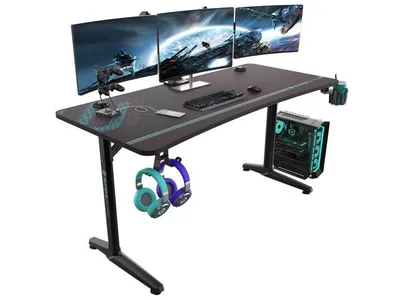
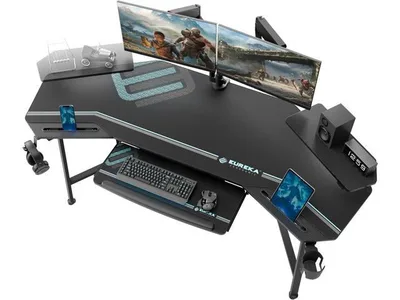
This is the desk I point most people to, and the reasoning is about surface and stability, not styling. Sixty inches of carbon-fiber-textured top gives you room for an ultrawide or a dual-monitor pair plus a full-size mousepad, and it runs deep enough that a big panel sits at a sane eye distance instead of looming in your face. The cable management is built into the frame rather than bolted on after the fact, so the wiring for a full tower, monitors and peripherals actually has somewhere to go. Underneath is the heavy steel frame Eureka is known for: lean on a corner and it stays put, which is the whole difference between a desk and a monitor-shaking liability. It is fixed-height, so it is not the choice if you want to stand, but for a seated battlestation with the wall space to spare, nothing near the price feels this solid or this planted.
The catch: Fixed height and the carbon-fiber texture is a look, not a function - if you also work all day and want to stand, buy a sit-stand instead.
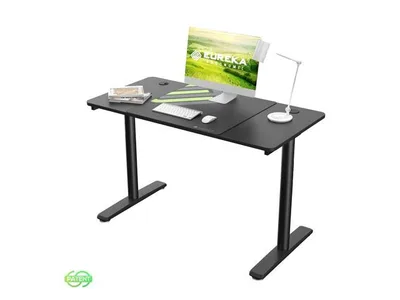
This is the stripped-down version of the pick above, and it is the right call when the constraint is square footage or money rather than ambition. Forty-seven inches comfortably seats a single monitor with a keyboard and mouse that still have room to move, and it rides the same steel frame as the Captain, so the lean test comes back just as reassuring. The look is plain modern rather than loud gamer, which means it reads fine in a home office as easily as a game room. You give up the width for a second monitor and the carbon-fiber flash, and the height is fixed, but you keep the build quality that makes Eureka worth buying in the first place. If your room genuinely cannot take a six-foot desk and you run one screen, this is where desk money stops buying features and starts buying honest square footage.
The catch: 47 inches is single-monitor width - a 34-inch ultrawide fits at a squeeze but dual monitors do not - and the height is fixed.
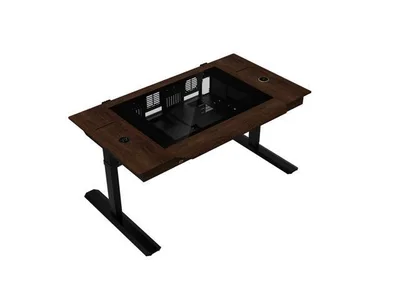
This is the most PC-builder desk ever made, and the one main pick here that actually stands. The body is a motorized sit-stand desk that doubles as a dual-system case: your components mount inside it under tempered glass, and there is wireless charging built into the surface. Because it is a genuine standing desk, the motor and the frame matter as much as the spectacle, and Lian Li over-built the thing. It carries a fully loaded build, monitors and an arm and still rises smoothly and holds steady at full height, which is exactly where cheaper single-motor desks start to sway. If you have ever wanted your build to be the furniture, nothing else on the market does this. I am not going to pretend it is a value play: it costs as much as a good GPU and you absolutely do not need it. But if the whole point of your setup is that people walk in and stare, this is the desk that earns the stare.
The catch: It costs as much as a good GPU and it is completely unnecessary - which, to be fair, is entirely the point of it.
Alternatives Worth Knowing
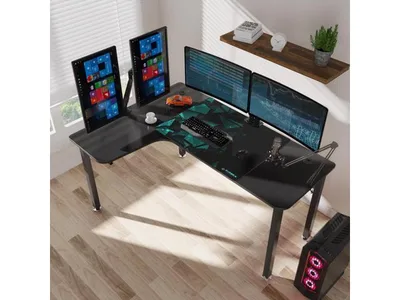
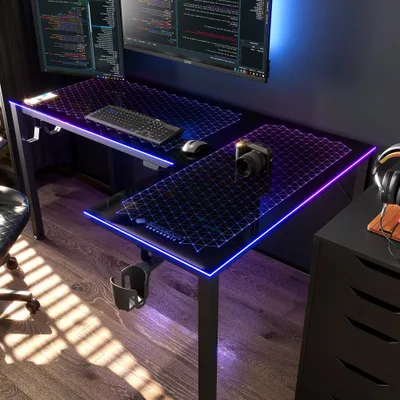
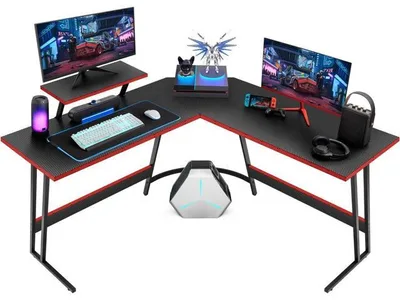
Same Eureka build quality and the same steel frame, bent around a corner. This is the play for multi-monitor setups, stream rigs, or anyone splitting one desk between a gaming PC and a work laptop, because the L wraps more usable surface into the same footprint. It ships with a full-surface mouse pad and it makes the most of a small room's usable wall, which is the entire reason to go L-shaped in the first place. I would only pick this over the straight 60-inch if your room layout actually has a corner to fill - against a flat wall the shape fights you and you are better off with the Captain.
The catch: It only pays off if your room has the right corner - in a flat wall layout the L-shape works against you.
Also in the conversation: the Secretlab Magnus Pro (~$800) is the premium metal sit-stand desk with magnetic cable management - beautifully engineered, priced accordingly; and if you want height adjustment without gaming branding, the standing desks in our office desk guide do the same job for less.
How to Choose (and What to Skip)
The good news is that the desk that lasts is the boring one. Get the size and the frame right and everything else is trim. Here is the short checklist, and the stuff to walk past.
- Width and depth beat features. 60x25 inches of stable surface improves your setup more than any RGB strip or cup holder. Depth is what keeps a big monitor a healthy distance from your eyes, so do not shave it to save a few inches of room.
- Do the lean test. Push down on a front corner. Wobble at desk level becomes monitor shake at eye level, and on a sit-stand desk it gets worse the higher you go - a motorized desk that feels solid seated and sways at full height is a bad buy no matter how nice the top looks.
- Check the weight rating before you trust a motor. A full tower, dual monitors and an arm add up fast. A dual-motor frame with an honest load rating handles it; a cheap single-motor lift stretched past its spec racks and stutters. Fixed desks sidestep the question entirely, which is part of why they cost less.
- Cable management is the one "gaming" feature worth paying for. Grommets, under-desk trays, or channels keep a multi-device build from looking like a nest. If your desk lacks it, a $30 cable tray bolts onto anything.
- Skip the gamer tax. RGB underglow, molded headset hooks, branded "gamer" surfaces and cup holders add cost, not capability. Particle-board tops flex and chip under a heavy load, so treat a sub-$120 desk as a light-duty surface, not a home for a 40-pound tower.
- Protect the floor and your rolling. A proper chair mat saves hardwood and makes cheap casters feel expensive.
More Options Worth a Scroll
More surfaces worth a look:
The Bottom Line
Buy the frame, not the branding. For the great majority of setups the Eureka 60-inch Captain is the honest answer: enough surface for a real multi-monitor rig, cable management that is built in, and a steel frame that does not flinch when you lean on it - all for a hundred dollars less than the desks it looks like. Drop to the 47-inch if the room is small and the budget is tight, step up to the DK-07 only if you want your build to be the centerpiece and stand while you play. Everything past that is either width you may not need or a gaming tax you definitely do not.
Related reading
- The best ergonomic setup for 2026 - three complete matched stations (chair, desk, mat, monitor arm) at three budgets
- The best office desks for 2026 - sit-stand height adjustment without the gaming tax
- The best chair mats for 2026 - protect the floor and make cheap casters roll like expensive ones
- Gaming setup accessories worth buying - cable trays, arms, and the small upgrades that clean up a desk
Found this useful? Pass it along:
Frequently Asked Questions
What is the best gaming desk in 2026?
The Eureka Ergonomic 60-inch Captain series (~$250) is the best gaming desk for most setups - a big carbon-fiber surface with cable management at a fair price. On a budget, Eureka's 47-inch desk (~$170) covers a full single-monitor battlestation. The showpiece is the Lian Li DK-07, a motorized standing desk with your PC built into it.
How big should a gaming desk be?
For one monitor, 47 inches wide is comfortable. For dual monitors or an ultrawide plus peripherals, go 60 inches or more, with at least 25-30 inches of depth so a big monitor sits far enough from your eyes and your keyboard and mouse have room in front of it.
Are gaming desks actually different from regular desks?
Mostly in the details: cable grommets and trays, water-resistant surfaces, headphone hooks, and full-surface mousepad-friendly tops. None of it is essential, but built-in cable management genuinely reduces setup chaos, especially with RGB-heavy multi-device builds.
Is a standing gaming desk worth it?
If you also work at the desk, yes - alternating positions across a long day matters more than any chair. If the desk is purely for evening gaming sessions, a fixed desk saves hundreds. Nobody stands during ranked.