The Best Budget Mechanical Keyboards of 2026 (Under $100)
Some links in this guide are affiliate links - we may earn a commission at no extra cost to you.
Something strange happened to cheap keyboards: they got good. Not "good for the price" good - actually good. Five years ago a sub-$80 board meant mushy switches, hollow rattly plastic, and keycaps that went shiny in a month. Today the same money buys gasket mounting, factory-lubed switches, sound-dampening foam, and hot-swap sockets - the exact recipe that used to mean a $150 custom build and an afternoon with a soldering iron. The listings all promise a "creamy" sound (their word, not ours), and the annoying part is that the spec sheet behind the marketing now actually backs it up.
If this is your first real mechanical board, here is what actually decides how it feels, roughly in the order that matters.
Switches: linear or tactile. Linears (usually red) glide straight down with no bump, which most gamers and fast typists prefer. Tactiles (usually brown) give a small bump partway down so you feel the keypress register, which some people find more accurate for typing. Neither is objectively better, but budget boards now ship both factory-lubed, which is the smoothness upgrade that used to cost you an afternoon of hand-work.
Hot-swap is the one spec you do not compromise on. Hot-swap sockets let you pull a switch out and drop a new one in with no soldering. On a cheap board that single feature is the difference between a disposable purchase and a platform you keep and tune for years. A soldered budget board is a dead end; a hot-swap board grows with you.
Gasket mount is where the sound comes from. Instead of screwing the plate rigidly into the case, a gasket mount floats it on soft strips so the board flexes slightly and the typing sound goes from hollow and pingy to deep and muted. Paired with a layer of foam, it is most of why these boards sound like they cost triple.
Keycaps: PBT beats ABS. Cheap boards used to ship thin ABS caps that go greasy and shiny fast. PBT plastic resists that shine, has a grippier texture, and holds its legends longer. Not every budget board ships PBT, and it is the single easiest thing to upgrade later - more on that below.
Wireless or not. Use wired or a 2.4GHz dongle for anything competitive; Bluetooth is fine for a couch or a work machine but adds a hair of latency. Battery size is the real wireless spec, and a big cell means you charge it a few times a year instead of every week.
How we rank: we weigh what actually changes the experience under $80 - sound and typing feel, whether the board is a hot-swap platform or a dead end, and honest value against boards that cost two and three times more. We re-check prices and stock every quarter, because budget models get discontinued and re-badged constantly.
At a glance
The one I point most people to: EPOMAKER Aula F108
This is the board that built a subreddit's worth of hype, and once you hear it you understand why. For around $80 you get a gasket mount and pre-lubed switches - the exact recipe that used to mean a $150 custom build and an afternoon of labor - delivering that muted, deep sound straight out of the box. It genuinely embarrasses keyboards three times its price, which is the whole reason it became the default recommendation for a first "real" board.
What keeps it from being a dead end is the hot-swap sockets: any 3- or 5-pin switch drops in without a soldering iron, so the board grows with you instead of getting tossed the moment your taste changes. It is tri-mode too, running over 2.4GHz, Bluetooth, or wired. The full-size layout gives you a real numpad, which is the whole point for spreadsheet and number-pad people and the catch for anyone tight on desk space. If you want one board that just works and can be tuned later, this is it.
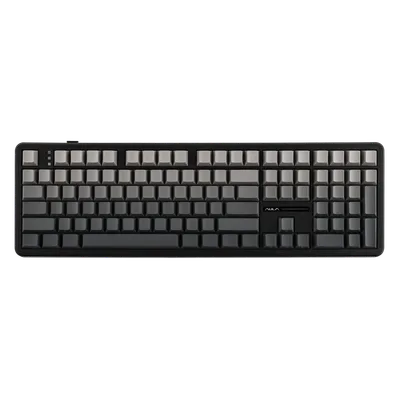
The Aula F108 is the clearest proof that the budget category caught up. Gasket mount, factory-lubed linears, and internal foam combine into a sound and typing feel that reviewers keep comparing to boards costing $200, and they are not wrong. Hot-swap sockets mean it is a platform, not a purchase you outgrow - swap switches whenever your taste changes, no soldering iron required. Tri-mode connectivity covers wired, 2.4GHz, and Bluetooth, so it fits a desktop and a couch equally. The full-size layout is the only real decision point: you get a proper numpad, but it pushes your mouse further right. If that trade works for you, nothing near $80 feels this finished.
The catch: It is a full-size board, so the numpad eats mousepad space, and there is no volume knob or screen - those live on the pricier F108 Pro.
The wireless pick: EPOMAKER TH108
If your keyboard lives away from a charger, this is the one to grab. It runs the same gasket-mount-plus-foam formula as the F108, so the sound and feel are in the same class, but the headline is the 8000mAh battery, the biggest in this class by a wide margin. That is the kind of cell that goes weeks between charges, so wireless stops being a thing you manage and just becomes how the board works.
It is also hot-swappable, so the upgrade path stays open, and the 2.4GHz link is stable enough that it will not drop out mid-ranked. The stock keycaps are perfectly fine rather than a highlight, which matters less than it sounds given how cheap and easy the keycap fix below is. Buy this one if a tidy, cable-free desk or an occasional move to the couch matters more to you than the F108's marginally nicer factory caps.
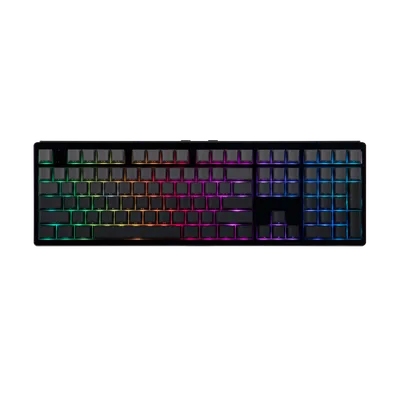
The TH108 takes the F108's recipe and solves the one thing budget wireless usually gets wrong: battery anxiety. Its 8000mAh cell is enormous for a keyboard, so months between charges is normal rather than a best case. The gasket mount and foam keep it in the same sound tier as our top pick, and hot-swap sockets mean it is just as tunable down the line. Connectivity spans 2.4GHz for low-latency play and Bluetooth for everything else. The compromises are minor and honest: media hotkeys instead of a dedicated knob, and stock caps that are good rather than great. For a wireless full-size board that you rarely have to think about, this is the value play.
The catch: Stock keycaps are fine rather than special, and you get media hotkeys instead of a volume knob - that lives on the TH108 Pro.
The $22 upgrade that transforms any board
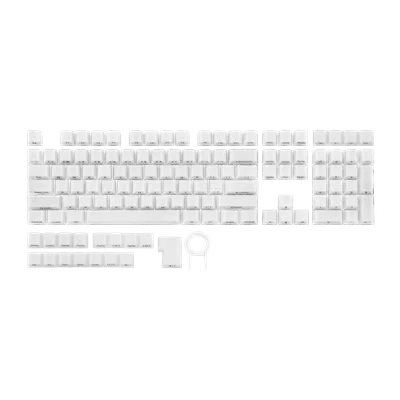
Your board sets the ceiling on how good it can sound; a fresh set of keycaps is how you actually cash in that potential and make the thing look and sound like yours. It is the highest-return ten minutes in the hobby - pull the old caps, press the new ones on, done, no tools beyond the puller in the box. Thicker caps subtly change the acoustics on top of the obvious cosmetic swap, and a universal set fits any standard MX-style board, including both picks above. If your board already shipped good PBT caps and you love the look, skip this and save the money. But most budget boards come with the usual thin, slightly hollow stock caps, and if yours did, this is where the next $22 goes instead of a whole new keyboard.
What "creamy" actually means, and which of these sound like it
Every listing on this page uses the word, so it is worth defining. A creamy keyboard is one where each keypress lands as a single low, smooth thud rather than a sharp click with a metallic tail. The sound is dampened and slightly muted - people compare it to a marker cap on a desk. It is not a switch type or a spec you can filter by, which is exactly why manufacturers can print it on any box.
Three things actually produce it, and none of them are the switch alone. Factory lubrication kills the scratchy high-frequency edge of the stem sliding in the housing. Gasket mounting lets the plate flex a little on impact instead of transmitting the shock into a rigid case, which drops the pitch. And internal foam absorbs the hollow reverberation of the empty plastic shell underneath - the single biggest difference between a $30 board and a $90 one that sounds like a custom.
The practical version: linear switches (reds and their many renamed cousins) go creamy far more readily than tactiles or clickies, because there is no bump or click mechanism adding a second noise. Every board on this page ships lubed linears with gasket mounting and foam, which is precisely why they sound the way they do at this price. If you want to push it further, the keycap swap in the section above changes the sound profile more than another $40 of keyboard would - thicker PBT caps deepen the pitch noticeably, and it is the cheapest real upgrade available here.
One honest caveat: sound is the most subjective thing about a keyboard, and "creamy" means slightly different things to different people. If you type in a shared room, a quieter board matters more than a deeper-sounding one, and those are not the same goal.
How to choose (and what to skip)
By now the pattern is clear: under $80, a few things decide whether you love a board, and a lot of the marketing is noise.
Do not pay extra for these. Per-key RGB, a tiny LCD screen, a metal volume knob, and "gaming" branding pad a spec sheet and the price tag without changing how the board types or sounds. They are fine if they come along for free, not worth a premium. The volume knob is the classic upsell - the F108 Pro and TH108 Pro exist mostly to charge more for one.
Do insist on these. Hot-swap sockets, a gasket mount with foam, and factory-lubed switches. That trio is the entire reason budget boards caught up to customs, and all three of our picks have it. A soldered board with none of it is a dead end no matter how low the price.
Pick a layout you will actually live with. Full-size gives you a numpad at the cost of mousepad space; a smaller 75% or TKL board frees up desk room and lets you center your mouse, which competitive players tend to prefer. Both picks above are full-size, so if you want compact, that is the main thing to shop for.
Mind latency for ranked play. Wired or a 2.4GHz dongle for anything competitive, and save Bluetooth for a laptop or the couch. If you want analog hall-effect switches with adjustable actuation and rapid trigger, that is flagship territory rather than budget - see the full keyboard guide.
The keyboard is one seat at the desk. The mouse guide and setup accessories cover the rest of it.
The bottom line
Budget mechanical keyboards stopped being a compromise and quietly became the smart default. For most people the move is simple: buy a gasket-mounted, hot-swappable board in the $80-90 range, spend another $22 on keycaps if the stock set is dull, and you end up with something that looks and sounds like a custom build for a quarter of the price. Because it is hot-swap, it is not a purchase you outgrow - it is a base you tune. Step up to a flagship only when you specifically need analog switches or a feature a budget board genuinely cannot fake. Everyone else has been overpaying, and the boards on this page are the proof.
Related reading
- Thocky, creamy, marbly, clacky: the best board for every sound - what these boards actually sound like, decoded
- The best gaming keyboards of 2026 - flagship and hall-effect picks when budget is not the constraint
- Best gaming mouse 2026 - pair the board with the right pointer
- Best gaming setup accessories - the rest of the desk, from mousepads to lighting
- Build a PC - our free tool for the tower that sits under all of it
Found this useful? Pass it along:
Frequently Asked Questions
Are budget mechanical keyboards actually good now?
Yes, and it happened fast. Gasket mounting, factory-lubed switches, sound-dampening foam, and hot-swap sockets used to be $150+ custom-build territory. Since 2025, sub-$80 boards from EPOMAKER, Aula, and Redragon ship with all four. The gap to premium boards is now firmware polish and materials, not sound or feel.
What does hot-swappable mean and should I care?
Switches pull out without soldering, so you can change how the whole board feels for $22 instead of buying a new keyboard. On a budget board it is the single most important spec - it turns your first keyboard into a platform instead of a dead end.