Prebuilt vs Building a PC in 2026: The Math Just Flipped
Some links in this guide are affiliate links - we may earn a commission at no extra cost to you.
For the whole decade I have been running these numbers, the answer to "should I build or buy?" was never in doubt: you build, because a retail parts list always undercut the same machine in a box. The 2026 memory crisis is the first thing to genuinely test that rule. RAM went up 3-5x, NAND doubled, and those two lines sit inside every PC you could buy. But the prebuilt makers locked their component contracts before the surge, so they are shipping last year's memory prices in this year's boxes - and in one specific price band, that hands them a lead a retail shopper simply cannot match this week.
That is the flip, and it is real. It is also narrower than the headline sounds. The crisis moved the sticker price in a slice of the market; it did not move the things that make DIY worth doing in the first place. When you build, you choose the quality of every part, you own the upgrade path forever, and you never pay for a corner someone quietly cut to hold a price point. None of that showed up on a spreadsheet, and none of it went away in 2026.
So this is not team-build versus team-buy. It is a question of what you are actually optimizing for. If you want the best long-term value, control over what goes in, and a machine you can upgrade a piece at a time, building still wins - and it always will. If you want a warranty, your weekend back, and zero sourcing hassle, a prebuilt is a legitimate answer, and right now it is a cheaper one than usual in the mainstream tiers. Below is the honest breakdown of exactly where each one wins.
How we compare: we run a build generator that reprices every DIY configuration each morning from live retail data, then set those totals against the prebuilts actually selling this week. We are the last site with a reason to root for prebuilts, so when our own math says buy, it means something. Updated August 4, 2026 - we re-run these numbers monthly.
The short version
Build it yourself if you can source the parts and you want what building actually buys you: the best value over the machine's life, control over every component's quality, and an upgrade path you own outright. Buy a prebuilt if you value a single warranty, your time, and zero-hassle sourcing more than that - and right now, in the $1,000 to $1,900 band, buying also happens to cost less, because contract pricing is handing prebuilt shoppers a GPU class they cannot touch by building this week. The machine that best captures that window is the Skytech Azure 3 (RTX 5070): an RTX 5070 with 32GB of DDR5 for around $1,700, when our own DIY list with a weaker GPU comes out to $1,417. The rule that holds either way: never buy a prebuilt that refuses to name its parts.
Build vs buy at a glance
One table, five factors. Free to cite with a link to bottleneckpc.com.
| Factor | Building it yourself | Buying a prebuilt |
|---|---|---|
| Cost, $1,000-1,900 | Retail parts pay full crisis prices | Bulk contracts = last year's component prices; often cheaper this week |
| Cost, $2,000+ | Best performance per dollar; you pick every part | Contract edge fades; roughly even to worse |
| Part quality | You choose every PSU, RAM kit, and cooler | Cheap builds cut corners on PSU, RAM, SSD, and cooling |
| Warranty | Per-part warranties you manage yourself | One number to call; whole-system coverage |
| Upgradability | Standard parts, upgrade anything for years | Great if standard ATX, a trap if proprietary |
| Time and effort | An afternoon of assembly plus troubleshooting | Unbox, plug in, play |
The pattern to read out of that table: prebuilts win the two columns you feel on day one (up-front cost in the mainstream band, and time), while DIY wins the three that compound over the years you own the machine. Which set matters more is the whole decision, and the rest of this page is the detail behind each row.
Cost: the crisis narrowed the gap, it did not close it
The reason prebuilts undercut DIY right now is not that they got better. It is that retail components got expensive faster than OEM contracts did. A 32GB DDR5-6000 kit runs about $430 at retail today; a 2TB Gen4 SSD is roughly $360 as a loose part. System builders contracted both months ago, some at close to half those numbers, so a machine full of "last year's prices" can beat a parts list paying today's. That advantage is concentrated in the $1,000 to $1,900 band, where memory and storage are a big slice of the bill. iBUYPOWER has even moved an RTX 5070 machine with an i5-14400F for around $1,100 at big-box retail - a GPU our DIY math cannot justify below roughly $1,600 right now, though the catch is a single 16GB stick of RAM you will want to fix.
Push past $2,000 and the edge fades: the memory share of the build shrinks, the contract discount stops mattering, and hand-picking parts reclaims the best performance per dollar. And because retail prices move daily, treat the DIY totals below as this-week snapshots - the live build generator always has the current number.
The prebuilt saves you real money, but read the fine print: the 8GB GPU variant and half the RAM. This is the tier where the checklist below earns its keep.
An extra $280 buys a full GPU class jump, DDR5 over DDR4, and liquid cooling. DIY cannot touch this configuration right now - we tried.
Same CPU, same GPU, same money. DIY gets 2TB and a hand-picked parts list; the prebuilt gets a warranty and zero labor. Both answers are correct here.
What 145 tracked machines actually show
Those three tiers are snapshots. Here is the whole set behind them: we track 145 in-stock prebuilts across 35 graphics cards, repriced every morning alongside the parts list they compete with.
The median tracked machine is about $1,579, and 41 of them, nearly a third, are under $1,000. The cheapest current-generation machine in the set is a $949 Arc B580 tower, a card our score puts comfortably in 1440p territory. Try assembling a current-gen 1440p box for $949 at this week's memory prices.
Parts list vs prebuilt at three budgets (our tracker, this week)
Below $1,500 the buy column keeps winning or tying; at $2,400 the same comparison flips $400 the other way. Neither side of the old argument survives contact with both rows.
The worked example, so this is not hand-waving
Take that $949 Arc B580 machine and try to build it at this week's retail prices. The card alone runs about $300. A 16GB DDR5 kit last sold on our tracker around $250, and as of mid-September no brand-name one is in stock at all. A 1TB drive around $190. Before you have bought a CPU, motherboard, power supply, case, or Windows license, you have spent $740 of your $949, and those five remaining items cannot be bought decently for $209. A sane self-build of that machine lands somewhere between $1,100 and $1,200.
The prebuilt is not cheaper because someone is being kind. It is cheaper because its builder bought that RAM and SSD months ago at prices that no longer exist.
Now flip it: the same dataset's upper floors hold $2,400 machines whose visible parts price out near $2,000 retail even at crisis prices. Same market, same week, opposite verdict. That is the entire point. "Prebuilt vs DIY" stopped having a single answer, so the useful skill is pricing the specific machine rather than reciting a rule from 2019.
Part quality: where the cheap builds cut corners
The same contract economics that make the good prebuilts great value let the cynical ones hide downgrades. Holding a sticker price when components get more expensive means cheapening whatever the marketing does not mention, and a spec sheet only lists what the brand wants you to read. When you build, you make every one of those calls yourself - the PSU, the RAM kit, the cooler are all chosen on merit. When you buy a cheap prebuilt, you get whatever hit the contract price, and here is where it usually hides:
- The power supply becomes an unnamed "500W" unit - the single most common downgrade, because no one reads that line. It caps every future upgrade and takes the rest of the machine with it when it dies.
- The RAM becomes one stick instead of two. Same gigabytes on the spec sheet; single-channel operation silently costs 10-15% of your framerate.
- The GPU becomes the 8GB variant of a card that also ships in 16GB. Same model name on the box, very different life span.
- The SSD becomes a DRAM-less mystery drive that benchmarks like the good ones for about ten seconds at a time.
- The motherboard and PSU become proprietary shapes, so the cheap parts cannot even be swapped for standard ones later. The machine is disposable by design.
The brands drawing the most fire for this are Alienware and the big-box budget lines; the ones the community keeps praising for transparency are Skytech, NZXT BLD, PowerSpec, and Origin, because they name every component. Here is the trap in the wild:
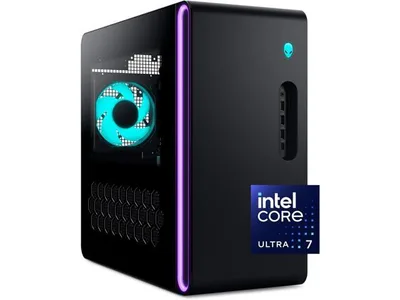
The exhibit - read before buying
This is a real listing at $1,499, and the headline parts are genuinely fine - the Ultra 7 265F is a real CPU and the RTX 5060 Ti is a real GPU. The problem is everything the listing does not say. It never names the PSU brand or rating. It says 16GB of RAM without telling you whether that is one stick or two, and single-channel silently costs you 10-15% of your framerate. It does not name the SSD model. And Dell has a long history of proprietary boards and power supplies that quietly block the upgrades you would want to make later.
Put it next to the Azure 3 further down, which names every component and hands you a full GPU class more for $200. I am not telling you this is a bad computer. I am telling you it is an unanswerable one, and this is the first year in a long time where the answerable machines are also the cheap ones.
The catch: You are not buying a bad computer, you are buying an unanswerable one - in a market where the answerable machines finally got cheap.
Warranty and support: the prebuilt's real, permanent edge
This is the one prebuilt advantage the memory crisis did not create and a price correction will not erase. Buy a whole machine and you get one warranty covering the whole system, one number to call, and someone else to diagnose which part died. When you build, you are the support desk. Every component carries its own warranty - often longer individually than a system builder's one-to-three-year blanket - but you are the one isolating a no-post at midnight, figuring out whether it is the RAM or the board, and handling five separate RMA processes if it comes to that.
For a lot of people that trade is easy and points toward DIY: troubleshooting is part of the hobby, and per-part coverage outlasts the system warranty. But if you are not technical, or a machine being down for a week during finals or a deadline would genuinely wreck you, single-point support is worth paying for. That is a real reason to buy, entirely separate from the price math, and it holds in years when building is cheaper too.
Upgradability: who owns the machine's future
This is DIY's quiet, compounding win, and the reason the cost comparison undersells building. A machine you built from standard ATX parts is a machine you can upgrade one piece at a time for years - drop in a new GPU, add a second SSD, move the whole thing to a new case, and reuse the PSU and storage in your next build entirely. Nothing about that shows up in a day-one price, and all of it is value.
Prebuilts split hard on this. The good ones, like Skytech's Azure line, are standard ATX inside, so you can crack them open and treat them exactly like a machine you built. The bad ones use proprietary motherboards and power supplies - the Dell and HP special - which means the cheap parts they shipped cannot be replaced with normal ones later, and the box is disposable the moment one thing you cannot buy off a shelf gives out. If you plan to own a machine for more than one GPU generation, that difference matters more than the sticker. And often the smartest upgrade is not a whole new PC at all: run your current parts through our bottleneck checker first, because the right answer might be a $700 GPU swap, not a $1,700 machine.
Time and effort: the honest non-money reason to buy
Not every reason to buy a prebuilt is about dollars, and pretending otherwise is dishonest. Building a PC is an afternoon of assembly, cable management, and the occasional stomach-drop of a machine that will not post while you work out which cable you forgot. A prebuilt arrives assembled, cable-managed, stress-tested, and usually with the OS already installed. You unbox it, plug it in, and play.
If your time is scarce or the idea of troubleshooting your own hardware sounds like a chore rather than a Saturday, that convenience is worth real money and always has been. The only thing to keep clear-eyed about is that you are paying a convenience premium, not getting a better machine for it - in the tiers where prebuilts also happen to be cheaper right now, you get both, which is exactly why 2026 is an unusual year. Just do not confuse "easier" with "better value over five years," because those are two different questions with two different answers.
The 5-line checklist (screenshot this)
Before buying any prebuilt, find these five answers in the listing. Every "not specified" is a downgrade wearing a trench coat:
- PSU: exact brand and 80+ rating? ("500W" alone = no)
- RAM: how many sticks? (1x16GB = silent performance cut; you want 2x8 minimum, 2x16 ideally)
- GPU variant: exact VRAM? (an RTX 5060 Ti 8GB is not the 16GB card)
- SSD: exact model or at least generation? ("1TB NVMe SSD" alone = the cheapest one that exists)
- Motherboard/PSU: standard form factors? (ask support; Dell/HP historically no)
If a listing passes all five, it is one of the honest ones - and in this market, the honest ones are legitimately good deals. Buy without guilt.
If you are buying: the two that pass our own checklist
For readers who land in the buy camp, these are the machines our DIY math could not beat this quarter. Both name every component, both are standard ATX, and both clear all five checklist lines.
At a glance
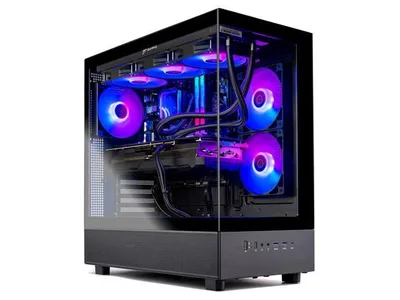
This is the machine that comes closest to breaking the always-build-it-yourself rule. You get an RTX 5070, 32GB of DDR5-6000 (a kit that runs about $430 at retail on its own right now), a 1TB Gen4 NVMe, a named 850W 80+ Gold ATX 3.0 power supply, and a 360mm AIO - and Skytech lists every one of those parts by name, which is exactly what a builder with nothing to hide does. It is around $1,700 on Amazon with a Ryzen 7 7700X, or $1,899 at Newegg with an i7-14700F.
The part that still surprises me is that our equivalent DIY parts list, built around a weaker GPU, comes out to $1,417. An extra couple hundred dollars buys you a full GPU class jump you cannot match by building right now. And because the whole thing is standard ATX, you keep the upgrade path - which is the piece cheap prebuilts usually take away, and the reason this one is worth buying when so many are not.
The catch: You get 1TB where a $2,000 DIY build gets 2TB, and you give up part-by-part warranty control - neither dents the value at this price.
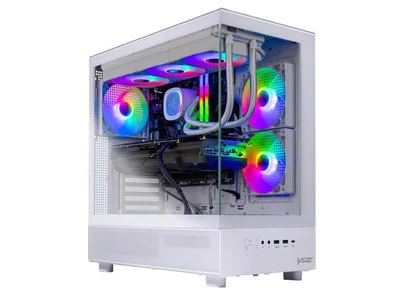
Move up a tier and the value argument turns into a genuine coin flip. This is the same CPU and GPU as our $2,000 DIY build - a Ryzen 7 9700X paired with an RTX 5070 Ti - for roughly the same money, around $2,100-2,300 on Amazon, with a 9800X3D and 2TB version running $2,599 at Newegg.
So it comes down to what you actually want. Building gets you 2TB, a hand-picked parts list, and the afternoon spent putting it together. This gets you a warranty, a 360mm AIO already mounted, and your weekend back. I genuinely will not argue with either choice at this tier: the money is a wash, so buy the one that matches how you want to spend your time.
The catch: The base config ships with 1TB, and the DIY equivalent costs the same with 2TB - here you are trading storage for convenience, not saving money.
When our own delta badge lies to you
Our build generator shows matching in-stock prebuilts next to every parts list it produces, with a "$X less than building" badge on each one. That badge is subtraction against a full parts list at that budget, and it is honest as far as it goes. Three ways to misread it:
- It says nothing about the parts the listing omits. A big green number next to an unstated power supply deserves suspicion, not celebration.
- It compares against building new. If you are a used-market shopper, the secondhand route can beat both sides.
- A marketplace seller's prebuilt carries a marketplace seller's warranty, which is not the retail warranty a self-build gets on every component.
The badge starts the analysis. The five checklist lines above finish it.
The two-minute check that settles any specific machine
Skip the forum argument entirely:
- Put the machine's GPU into the build generator at the machine's price. It assembles the best self-build at that money and shows the prebuilt delta right beside it.
- Run the listed CPU and GPU through the bottleneck calculator. The cheap-machine trick of a current GPU behind a three-generation-old CPU shows up instantly.
- Check what the listing does not say. No PSU wattage, no motherboard model, no RAM speed? Priced accordingly.
Or start from the other side and browse the full prebuilt set filtered by GPU, budget, and builder, with each machine tagged by the resolution our scores say its card can actually hold.
Who should build, and who should buy
Build it yourself if you can source the parts and any of these sound like you: you want the best value over the life of the machine, you have an opinion about the case, the fans, or the storage, you plan to upgrade one part at a time for years, or you are not starting from scratch and already own a case, PSU, and drives worth reusing. Above roughly $2,500 this is nearly always the answer, because the contract advantage fades and hand-picking parts reclaims the best performance per dollar. Building also stays the move for anyone who treats the assembly as part of the fun rather than a tax.
Buy a prebuilt if you value single-point warranty and support, your time is genuinely scarce, or you cannot reliably source parts at sane prices - and especially if your budget lands in the $1,000 to $1,900 band, where contract pricing is currently handing you a GPU class you could not buy by building this week. Just run the machine through the 5-line checklist first. In this market the honest prebuilts are real deals, and the traps are wearing the same sticker price.
The bottom line
The 2026 memory crisis did something I have not seen in a decade: it made buying a prebuilt genuinely cheaper than building, in one specific slice of the market, for as long as the contract pricing holds. That is worth knowing and worth acting on if a warranty and a free weekend are what you are after. But it did not change the deeper math. Over the years you own a machine, DIY still wins the things that compound - part quality you chose, an upgrade path you own, and a total value no boxed SKU matches. The flip is a moment, not a verdict.
So price out your exact build at your budget with live numbers in our PC builder, and if you already own a rig, check the bottleneck checker before you spend anything at all - the cheapest good machine is often the one you upgrade instead of replace. We reprice both sides of this page each quarter. The math will flip back eventually, and you will read it here first.
Related reading
- How to build a budget gaming PC - the step-by-step if you land in the build camp
- Should you build a PC in 2026? - the timing question, given the crisis
- RAM and SSD prices: buy now or wait? - why the components got this expensive
- Best GPU and CPU pairings for 2026 - balanced parts lists at every budget
- Console prices vs building a PC - the other build-or-buy question
Found this useful? Pass it along:
Frequently Asked Questions
Is it cheaper to build a PC than buy a prebuilt in 2026?
For the first time in roughly a decade, often no. The 2026 RAM/SSD price surge hit retail part prices much harder than prebuilt makers' bulk contracts, so at the $1,000-1,900 range a well-specced prebuilt frequently beats an honestly-priced DIY parts list. DIY still wins on transparency, upgradability, and part quality, and the gap closes again around $2,000+.
Why are prebuilts suddenly better value than building?
Component contracts. Prebuilt manufacturers buy RAM, SSDs, and PSUs in bulk at prices locked months ago, before memory and NAND prices went vertical. A 32GB DDR5-6000 kit costs around $430 at retail right now; Skytech is shipping that same kit inside $1,700 machines. You are effectively buying components at last year's prices.
Are prebuilt gaming PCs worse than they used to be?
The cheap ones often are. With component costs rising, some brands held sticker prices by downgrading what is inside - budget power supplies, single-channel RAM, DRAM-less SSDs, 8GB GPU variants, and proprietary parts. The spec sheet still says the same GPU; everything around it got cheaper. That is why the 5-line checklist matters more than ever: the good prebuilt deals are real, and so are the traps.
What should I check before buying a prebuilt PC?
Five things: the exact PSU brand and rating (a mystery 500W unit is the classic downgrade), whether the RAM is two sticks or one (single-channel silently cuts gaming performance 10-15%), the exact SSD model, the exact GPU variant (an RTX 5060 Ti 8GB is not the 16GB card), and whether the motherboard and PSU are standard parts you can upgrade later. If the listing will not name a part, assume the cheapest possible version of it.
How do I check if a specific prebuilt is a good deal?
Compare it against a self-build with the same graphics card at the same total. Our build generator prices a full parts list from live data and shows matching in-stock prebuilts next to it with the exact dollar difference, and the bottleneck calculator will tell you whether the listed CPU actually matches the GPU. Two minutes, no spreadsheet.
Which prebuilt brands are most transparent?
Community consensus currently praises Skytech, NZXT BLD, PowerSpec, and Origin for listing exact component models - Skytech names the PSU wattage and rating, RAM speed, and SSD generation right in the product title. Alienware and the budget lines draw the most criticism for vague spec sheets and proprietary parts. Transparency matters more than brand: any builder that names every component is self-reporting that it has nothing to hide.