The Best NAS for PC Builders in 2026 (Plus the DIY Server Route)
Some links in this guide are affiliate links - we may earn a commission at no extra cost to you.
Every PC builder eventually learns this the hard way: the machine you game on is the worst place to keep the only copy of anything. Drivers get beta-tested, Windows gets reinstalled, and drives get pulled and repurposed in the middle of your next build. A NAS is the boring, always-on shelf appliance that survives all of that - the box whose entire job is holding the files you cannot afford to lose while your gaming rig stays free to be a gaming rig.
A few things decide whether a NAS is the right one for you. Bays and capacity come first: two bays is the real minimum, because that is what lets you mirror a drive and treat a failure as an errand instead of a disaster, and most people should resist buying more bays than they will actually fill. Networking is next - 2.5GbE has quietly become the floor, and it is the difference between a 150GB game library copying in eight minutes or twenty, while 10GbE only earns its keep on big libraries and wired-up houses. Then there is transcoding, which matters the moment Plex enters the picture: an Intel x86 chip with Quick Sync will re-encode a 4K stream on the fly for the TV in the other room, where an ARM chip stutters and buffers. That single distinction drives most of the picks below.
Software is where it gets opinionated. Synology's DSM is still the best operating system in the category by a wide margin, but Synology's 2026 hardware ships ARM chips and 1GbE at prices where UGREEN hands you Intel silicon, 2.5GbE, and NVMe cache slots. For an audience that can navigate a BIOS, taking the better metal and living with slightly rougher software is usually the right trade, which is why this list skews UGREEN this year. One more thing to budget for: the same 2026 NAND and DRAM crisis that wrecked RAM and SSD prices came for hard drives too, so the NAS-rated disks you fill these boxes with are pricey right now. The enclosure is only half the bill - plan for the drives before you fall for a six-bay dream.
How we rank: we weigh these on the things that actually bite a home user - real transcoding muscle for Plex, whether the networking can keep up with a modern game library, honest capacity headroom, and price per usable bay in a market where the drives can cost as much as the box. We favor hardware you will not outgrow in a year over spec-sheet bragging rights, and we flag deal pricing as deal pricing.
The short version
For most PC builders, the UGREEN NASync DXP2800 is the one I would buy without overthinking it - a real Intel chip, 2.5GbE, and NVMe cache slots at a price where Synology still ships ARM and 1GbE. If $390 is more than you want to spend on a first NAS, the DH2300 at ~$200 is the cheapest box I would actually trust with your files. And when a Plex library outgrows two bays, the DXP6800 Pro is the endgame shelf. If you have an old gaming PC in a closet, though, you might not need to buy anything - the DIY section is at the bottom.
The one to buy for most builders: UGREEN DXP2800
This is the NAS I point almost everyone to, and its whole case is the Intel N100 inside it. That quad-core is what turns a box of spinning disks into a real Plex media server: it hardware-transcodes a 4K stream on the fly so the movie plays smoothly on the living-room TV instead of buffering, and it does the same job an ARM-based Synology at this price simply cannot. Around $390 also buys 2.5GbE that saturates most home networks, two NVMe slots for caching, and up to 64TB across its two bays - Synology-adjacent money for hardware a tier above it. Who it is for: the builder who wants one box to handle backups, a growing media library, and the odd file-server duty without ever feeling slow. If your Plex habit is casual and $390 stings, the budget pick below covers you; if two bays clearly will not, jump to the four-bay. For everyone in the middle, this is the default.
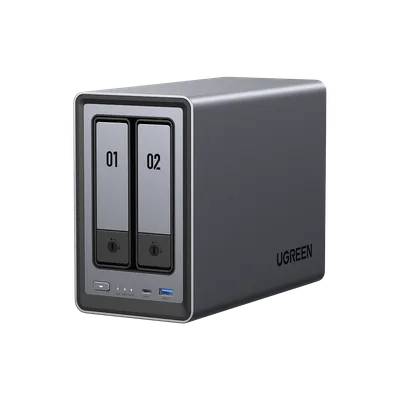
For a builder, the value is obvious: you are paying Synology-adjacent money and getting hardware from the next tier up. The catch is UGOS, which is perfectly usable but does not have the two-decade polish of DSM. If you can navigate a BIOS you can navigate UGOS, and that is a trade most of this site's readers should take happily.
The catch: UGOS is functional but not as polished as Synology's DSM, so you trade a little software gloss for a lot more hardware.
The cheapest NAS worth trusting: UGREEN DH2300
If $390 feels like a lot just to stop losing files, the DH2300 is the least you can spend and still buy a NAS I would trust with anything that matters. At around $200 you get two bays, and that is the number that counts: two bays means a proper mirror, so a dead drive is a Tuesday-night swap rather than a gut-punch. This is the front door to the category, and it is a genuinely good one instead of a compromise you regret in six months. Know exactly what you are paying for, though. Its job is rock-solid backup and light Plex streaming - direct-play a file to a device that can decode it and it is happy. Ask it to transcode several 4K streams at once and it will run out of muscle, because the lighter chip is not an N100. For a first NAS whose whole purpose is holding the copy that survives your next Windows reinstall, it does everything that matters and nothing you are overpaying for.
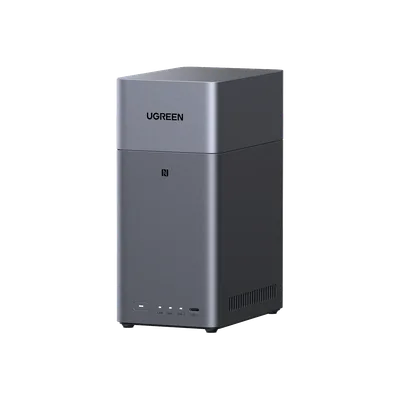
Spend the $200 here as a deliberate first step, not a downgrade. It is the copy that survives your hobby, living quietly on a shelf and asking nothing of you. When your library eventually wants real transcoding headroom, the DXP2800 is the natural graduation - but plenty of people never need to make that jump.
The catch: The lighter CPU is fine for backup and streaming but not heavy transcodes, so a big 4K Plex library will eventually want the DXP2800.
The four-bay step up: UGREEN DXP4800 GT (4-bay)
The July promotion that made this the standout buy has now closed, so read this as the four-bay option rather than the bargain it briefly was. When a deal window is open, this is the pick that jumps the ladder. Four bays changes what a NAS can be: you get real capacity and redundancy at the same time, so you can lose a drive and keep running while still leaving room to grow a library rather than immediately fighting for space. The GT trim adds faster networking on top, and around $590 during a Prime event is roughly 20% off, which is what pushes it past the two-bay boxes on value - but only if you already know two bays will not be enough. This is the prosumer step: a media collection that keeps expanding, a couple of simultaneous streams, maybe some backup-target duty for the other machines in the house. I would only steer you here over the DXP2800 if you are confident about the bay count, because deal pricing is a moving target and the discount is most of the argument.
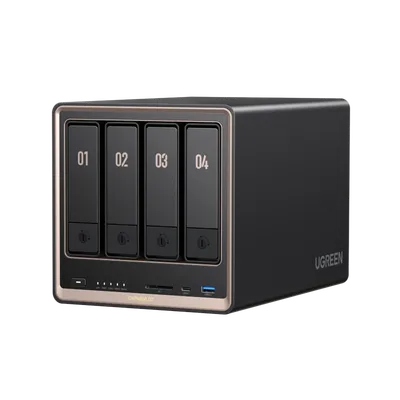
Check the price you actually see at checkout before you commit. If the discount has expired, the math changes and the DXP2800 goes back to being the smarter buy for anyone who is not certain they need four bays. Deal pricing is the entire reason this jumps the queue, so treat it as a window, not a permanent verdict.
The catch: The ~$590 that made this jump the queue was a July promotion and it closed on the 31st. At list price the two-bay DXP2800 is the better buy again.
The endgame shelf: UGREEN DXP6800 Pro (6-bay)
This is the box that runs a whole household's digital life without flinching. The Core i5-1235U handles anything Plex throws at it - multiple 4K transcodes at once, no drama - there is 10GbE built in for people who have actually wired their house for it, and six bays plus NVMe means years of headroom before storage is a conversation again. This is the pick for the person whose media library is the thing they optimize the home network around: a big collection, several simultaneous streams, drives they keep adding a pair at a time. The honest note is that it is overkill until it very much is not. Most people reading this should start with a two- or four-bay box and graduate here when it fills up, because paying six-bay money for a two-bay workload is lighting cash on fire in a year when drives are already expensive. But if you already know you are that person, this is the one you buy and do not revisit for a long time.
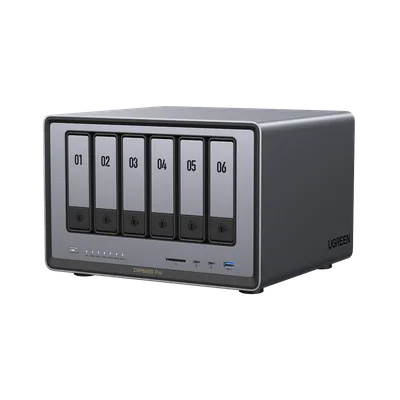
Buy it because you have outgrown something smaller, not because the spec sheet is exciting. If a two- or four-bay box is filling up, multiple people are streaming at once, and you are tired of thinking about storage, this is the tier where that stops being a fight for a long time.
The catch: It is genuine overkill until your library says otherwise, so buy it because you have outgrown a smaller box, not on spec.
The one exception: Synology DS224+
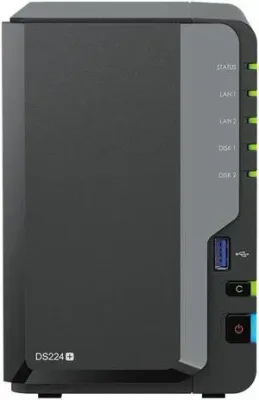
There is one reason to walk past the UGREEN picks entirely, and it is software. If you want the true appliance experience - the box that installs itself, backs up your phone without a thought, and never once asks to be maintained like a second computer - Synology's DSM is still the best NAS software ever made, and the DS224+ is the natural two-bay home for it. You pay for that polish in hardware: it is a 1GbE box with a weaker chip per dollar than the DXP2800, so heavy Plex transcoding and fast library transfers are not its strength. Buy it when set-and-forget reliability matters more to you than raw specs. For most of this site's readers the UGREEN trade is the better one, but if you have firmly talked yourself out of tinkering, this is the honest pick.
The free option: your old gaming PC is already a server
The NAS makers would rather you forget this one: the PC you retired when you built your last rig is more powerful than everything above it. Install TrueNAS (free) or Unraid (around a $60 license), fill the bays, and you have a server that transcodes circles around an N100 box. The honest trade-offs are real - it idles at 40-80W instead of 10W (call it $50-100 a year in electricity), it is bigger and louder, and it is one more machine to keep patched. That gap is exactly why the appliances above cost money: "never needs me" is worth real cash to most people. But if the hardware is already paid for and you enjoy tinkering - and you are reading this site, so you probably do - the DIY route is the best value in home storage, full stop.
How to choose (and what to skip)
A NAS is a long-term appliance, so buy for the next five years, not the next month. A few rules keep you out of trouble:
- Two bays minimum, always mirrored. A single-bay NAS is an external drive with a web page. Two bays in RAID1 turns a dead drive into an errand instead of a tragedy.
- Do not overbuy bays. Empty bays are not free future-proofing when disks are this expensive - buy the bay count you will realistically fill in a year or two and step up later. Most people never outgrow two.
- Buy the box diskless, then shop drives carefully. These enclosures ship without disks, and in 2026 the drives can cost as much as the box. Use NAS-rated drives built for 24/7 spin and RAID vibration - Seagate IronWolf or WD Red Plus - never desktop drives, and price the whole bundle before you commit.
- A NAS is not a backup by itself. It is the destination, not the strategy. The rule is 3-2-1: three copies, on two kinds of media, one of them offsite.
- Intel beats ARM for Plex. Hardware transcoding is the line between "plays on every screen in the house" and "buffers on the TV." If Plex is the point, do not buy an ARM box.
- 2.5GbE is the floor. Moving a 150GB game library over old 1GbE takes 20-plus minutes; 2.5GbE cuts it to about eight. 10GbE only matters for big libraries and houses already wired for it.
The bottom line
For most PC builders the DXP2800 is the whole answer: an Intel chip that actually transcodes, 2.5GbE, and NVMe cache at a price where the software-first competition is still shipping ARM. Spend less and the DH2300 is a genuinely trustworthy first NAS; spend up only when a growing library truly needs the bays, and reach for the DXP6800 Pro when it becomes the thing your home network revolves around. If you value flawless software over raw hardware, the Synology is the honest exception - and if there is a retired gaming PC in the closet, you may not need to buy anything at all. Whatever you land on, remember the two things that trip people up in 2026: mirror your drives, and budget for the disks as carefully as the box, because the NAND crisis made them the expensive half of this purchase.
Related reading
- RAM and SSD prices in 2026 - the NAND and DRAM crisis behind why NAS drives cost what they do
- Best NVMe SSD for gaming - if you are adding cache or flash storage to the mix
- Do you need a UPS? - an always-on NAS is exactly the box you do not want losing power mid-write
- Build a PC - spec the DIY-server route, or your next gaming rig, with live prices
Found this useful? Pass it along:
Frequently Asked Questions
Do I actually need a NAS as a PC gamer?
The moment you have things you cannot re-download - save files, clips, family photos, a Plex library - you need storage that is not inside the machine you overclock and beta-test drivers on. A 2-bay NAS in mirror mode survives a drive failure; the SSD in your gaming rig does not.
NAS or old gaming PC as a home server?
If you have a retired build collecting dust, the DIY route is free and more powerful - install TrueNAS or Unraid and go. Buy a NAS when you want something that idles at 10W, lives silently on a shelf, and never asks to be maintained like a second PC.