Core i7-9800X + NVIDIA RTX 2080 Ti Bottleneck Analysis
The Core i7-9800X pairs excellently with the NVIDIA RTX 2080 Ti at every resolution (5% at 1080p, 4% at 1440p, 2% at 4K) - buy this combo for anything from competitive 1080p to 4K gaming.
Balance across resolutions
1080p
Balanced
1440p
Balanced
4K
Balanced
Benchmark data updated July 2026 · prices sync daily from retail feeds · how we score
Component scores below are out of 100 on our gaming-performance scale, weighted by how much each resolution leans on the CPU vs the GPU - the closer the two weighted scores, the more balanced the pairing.

1080p (Full HD)
Well BalancedEstimated AAA Game FPS
Based on gaming scores. Actual FPS varies by title.perfperformance
118
FPS
balancedbalanced
92
FPS
ultraultra
70
FPS
Great pairing! The Core i7-9800X and NVIDIA RTX 2080 Ti are well-matched at 1080p (Full HD). Both components will be utilized efficiently with minimal performance waste. This is an ideal combination for this resolution.
1440p (Quad HD)
Well BalancedEstimated AAA Game FPS
Based on gaming scores. Actual FPS varies by title.perfperformance
92
FPS
balancedbalanced
67
FPS
ultraultra
46
FPS
Great pairing! The Core i7-9800X and NVIDIA RTX 2080 Ti are well-matched at 1440p (Quad HD). Both components will be utilized efficiently with minimal performance waste. This is an ideal combination for this resolution.
4K (Ultra HD)
Well BalancedEstimated AAA Game FPS
Based on gaming scores. Actual FPS varies by title.perfperformance
59
FPS
balancedbalanced
40
FPS
ultraultra
29
FPS
Great pairing! The Core i7-9800X and NVIDIA RTX 2080 Ti are well-matched at 4K (Ultra HD). Both components will be utilized efficiently with minimal performance waste. This is an ideal combination for this resolution.
Will it run the games you play?
Pick your games for an estimated FPS at 1440p, high settings.
Valorant
298-402FPS
High-refresh
Counter-Strike 2
245-331FPS
High-refresh
Fortnite
Balanced settings, no Lumen
160-216FPS
High-refresh
Marvel Rivals
154-208FPS
High-refresh
Call of Duty: Warzone
86-116FPS
Smooth
These are estimates, not benchmarks. Your actual frame rate depends on your exact settings, resolution scaling, drivers, and the scene on screen - treat these as a realistic ballpark at high settings, not a guarantee. Lower settings or upscaling (DLSS/FSR) push them higher; maxed-out ray tracing pushes them lower.
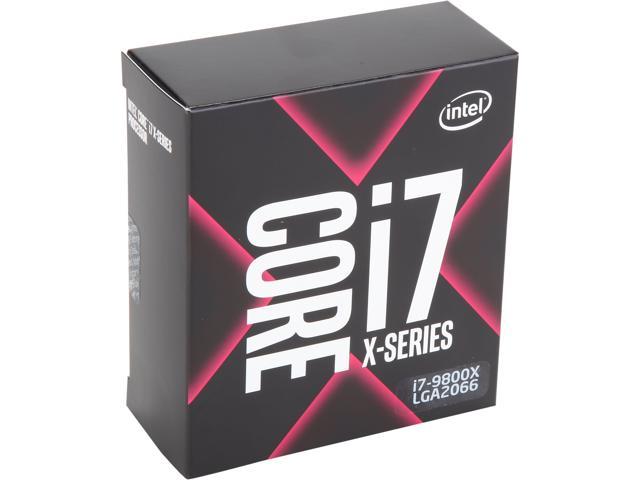
Core i7-9800X + NVIDIA RTX 2080 Ti
We do not recommend buying every part in this pairing today - the ones worth buying link out to retailers, and the rest point to current alternatives instead:
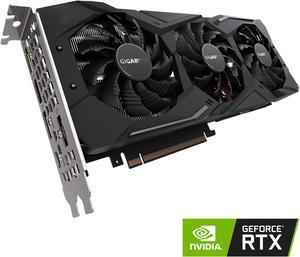
GPU · Score 56/100
NVIDIA RTX 2080 Ti
11GB VRAM · 250W TDP · used / remaining stock
The NVIDIA RTX 2080 Ti is discontinued - its price is an estimate of the used / remaining-stock market, not current new-retail.
Specs Comparison
| Spec | Core i7-9800X | NVIDIA RTX 2080 Ti |
|---|---|---|
| Gaming Score | 50/100 | 56/100 |
| Benchmark Score | 46 | 52 |
| TDP | 165W | 250W |
| Price | $150.27 | Not recommended |
| Socket / VRAM | LGA2066 | 11GB |
| Release Year | 2018 | 2018 |
Finish the Build
You picked the Core i7-9800X + NVIDIA RTX 2080 Ti - these tools answer the next two questions with this exact pairing already filled in:
Complete the Setup
Core's sorted with the Core i7-9800X + NVIDIA RTX 2080 Ti. Here's the gear that actually changes how it feels to play:
Explore Related Pairings
Frequently Asked Questions
Is the Core i7-9800X a bottleneck for the NVIDIA RTX 2080 Ti?
No, the Core i7-9800X and NVIDIA RTX 2080 Ti are well-matched at 1440p with only a 4% difference. This is an excellent pairing.
What resolution is best for the Core i7-9800X + NVIDIA RTX 2080 Ti?
The Core i7-9800X and NVIDIA RTX 2080 Ti are most balanced at 4k with only a 2% bottleneck. At 1080p, bottleneck is 5%. At 1440p, it's 4%. At 4K, it's 2%.
Should I upgrade from the Core i7-9800X or NVIDIA RTX 2080 Ti?
Neither - this pairing is well-balanced. Only upgrade when you want to target a higher resolution or need more performance in specific games.
Want to test other parts? Use our free bottleneck calculator to compare any CPU and GPU pair.