The Best Gaming Routers in 2026 - and the $15 Upgrade That Beats All of Them
Some links in this guide are affiliate links - we may earn a commission at no extra cost to you.
Router marketing has a favorite customer: the gamer who blames lag on hardware. Before this guide recommends anything, it owes you the truth those ads skip - if you can run an ethernet cable from your router to your PC, a $15 cable delivers lower and steadier latency than every router on this page, including the $700 one. Wired is not a tier on the list. It is the answer key.
The routers below are for everything after that truth: homes where the cable cannot reach, households where a stream and three phones fight your ranked match for bandwidth, and multi-gig internet plans that an old box physically cannot serve. Those are real problems, and 2026 is a good year to solve them - Wi-Fi 7 has fallen from early-adopter pricing into genuinely sensible territory, and its Multi-Link Operation feature is the first wireless change in years that helps latency consistency rather than just throughput on a spec sheet.
What actually matters when you shop: QoS that works (traffic prioritization so someone's 4K binge cannot spike your ping), wired ports you will actually use (count your devices; multi-gig matters only if your internet plan or NAS does), Multi-Link Operation if you game over Wi-Fi at all, and stable firmware from a brand that ships updates. What does not matter: claimed aggregate speeds summed across bands, RGB, and anything with "accelerator" in the name.
How we rank: published performance and latency testing from the router review labs, feature sets that survive contact with a real home, and street prices this week. We do not run a router test bench, and we say so - what we add is the honest sorting the category is missing. Prices refreshed quarterly.
The short version
Run a cable if you can - that is the fastest gaming router at any price. If you need the wireless box anyway, the ASUS RT-BE86U is the current sweet spot: Wi-Fi 7 with Multi-Link Operation, a 10G port, and ASUS's mature QoS at $200-270 depending on the retailer. Spend more only if your household or internet plan genuinely outgrows it; the TP-Link Archer GE650 covers the budget end without falling back to Wi-Fi 6.
The sweet spot: ASUS RT-BE86U
This is the box most gaming households should actually buy. Wi-Fi 7 with Multi-Link Operation for the consoles and laptops, a 10G port for the one connection that deserves better, and the AiMesh and QoS stack ASUS has been maturing for a decade. In the published round-ups it keeps landing as the value pick of the Wi-Fi 7 generation for exactly this reason: it carries the features that change your evening and skips the radios that change the spec sheet.
The honest limits: it is a dual-band unit, so a genuinely crowded smart home - dozens of clients hammering every band - is better served by the quad-band flagship below. And the styling is plain black corporate, which we count as a feature but your RGB shelf may not. If your internet plan is 1-2 gigs and your problem is "my ping spikes when the house is busy," stop here and put the savings toward the cable run.
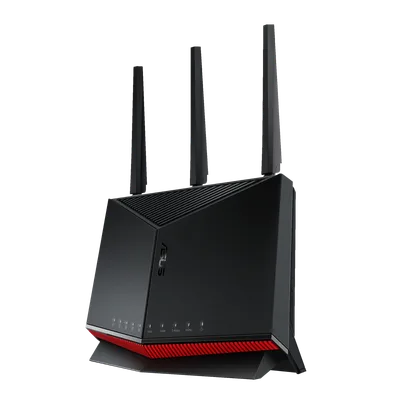
Wi-Fi 7, a 10G port, and mature QoS at the price where the value curve peaks. The gaming router for people who read past the marketing.
The catch: Dual-band only - a device-packed smart home that saturates every radio is the one household that outgrows it.
The no-compromise flagship: ASUS ROG Rapture GT-BE98 Pro
If the RT-BE86U is the sensible answer, this is the maximal one: quad-band Wi-Fi 7 with dual 10G ports and the deepest gaming-QoS toolkit ASUS ships. In publisher latency testing it holds the tightest numbers in the category, and the extra radios are not vanity in the right house - a dedicated band for the gaming machines while the rest of the household roams the others is a real, configurable thing here.
The price is the entire debate. At around $700 it costs more than many people's GPU, and the households that extract full value - multi-gig fiber, heavy concurrent streaming, a device count in the dozens, no possibility of running cables - are a minority. If you recognize your home in that sentence, nothing else on this page competes. If you hesitated, you are an RT-BE86U household doing flagship window-shopping, and there is no shame in it.

Quad-band Wi-Fi 7, dual 10G, and the tightest published latency in the category. For the busy multi-gig household that means it.
The catch: It is ~$700 of router - the households that genuinely use four bands and two 10G ports are rarer than the marketing implies.
Wi-Fi 7 on a budget: TP-Link Archer GE650
The budget slot in a router guide usually hides a two-year-old Wi-Fi 6 box in a gamer shell. The GE650 is the better idea: a current Wi-Fi 7 unit with Multi-Link Operation, 2.5G wired ports, and TP-Link's game-panel QoS at a street price near $300 as of mid-September - which, awkwardly, is more than the RT-BE86U above is asking right now, so it only earns this slot when a sale puts it back near $230. For an apartment or a smaller household, that covers every feature that actually touches your ping, and skipping the 10G tier you have no plan for is exactly the right corner to cut.
Know what the price leaves out: the wired ports top out at 2.5G, the radio count and range are apartment-scale rather than family-house-scale, and the RGB fins are load-bearing style, not substance. None of that undermines the point when the price is right - on sale this is the cheapest way to buy the Wi-Fi 7 consistency features without a compromise that will bite you at the latency level. At full price, buy the RT-BE86U.
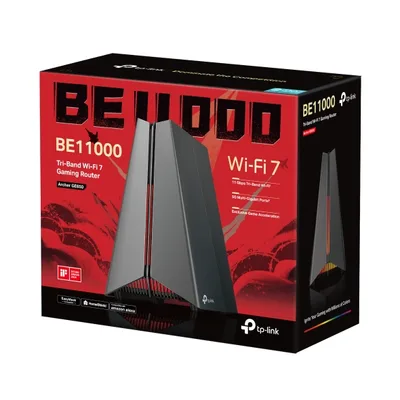
Real Wi-Fi 7 and working QoS, and the budget pick that is not secretly last-gen - but only when it is on sale below the RT-BE86U.
The catch: Apartment-scale range and 2.5G-max wired ports - right-sized for smaller spaces, undersized for a big busy house.
Before you buy any of them
Run the two-question check that saves most people this purchase entirely:
Is your problem ping spikes, or slow speed? Spikes when the house is busy point to QoS and congestion - a router problem, solvable above. Constant high ping to every server is your ISP, your distance, or your Wi-Fi link itself - and the fix is the cable, a powerline kit, or a plan change, not a fancier radio.
Is your frame rate actually fine? Choppy gameplay reads as "lag" but is usually the GPU or CPU falling behind, which no router can touch. Two minutes on the bottleneck checker tells you which side of the problem you are on before you spend router money on a graphics bottleneck.
Two more worth a look
The bottom line
Wire what can be wired - that advice outranks every product here. For the wireless remainder, the RT-BE86U at $200-270 is the gaming router with the honest feature set, the GE650 covers smaller homes for ~$300 without regressing to last-gen Wi-Fi, and the GT-BE98 Pro exists for the household that has already maxed the cheaper answers. Buy for QoS, ports, and Multi-Link Operation. Let someone else pay for the word "gaming" on the box.
Related reading
- Do you need a UPS for your gaming PC? - the other box between your PC and disaster
- The fastest gaming mice in 2026 - shaving the milliseconds on the other end of the chain
- Free bottleneck checker - make sure the lag is actually your network before buying network gear
Found this useful? Pass it along:
Frequently Asked Questions
Are gaming routers actually worth it?
Sometimes. The gaming features that matter are good QoS (so a Twitch stream or download cannot spike your ping) and enough wired ports for your setup. The features that mostly do not matter are RGB lighting, aggressive styling, and 'game accelerator' marketing. A strong general router with modern QoS gets you most of the way.
Does Wi-Fi 7 make gaming faster?
It makes gaming over Wi-Fi more consistent - Multi-Link Operation lets a client use two bands at once, which smooths out the latency spikes that older Wi-Fi suffers when a band gets congested. Raw ping to the server barely changes. Consistency, not speed, is the gaming win.
Is ethernet still better than Wi-Fi 7 for gaming?
Yes. A wired connection has lower and, more importantly, steadier latency than any wireless link, at any price. If you can run a cable to your PC or console, that is the single best networking upgrade in gaming, and it costs about $15.
How much should I spend on a gaming router?
Around $200-270 buys the current sweet spot: Wi-Fi 7, a multi-gig port, and real QoS. Spending $600-700 buys more radios and more 10G ports for busy households and multi-gig internet plans - genuinely useful, rarely necessary. Below $200, prioritize a known brand's Wi-Fi 7 entry over an aging Wi-Fi 6 'gaming' box.