The Best Budget Mics for Gaming and Streaming in 2026 (Under $100)
Some links in this guide are affiliate links - we may earn a commission at no extra cost to you.
Your headset mic is the reason your Discord friends keep asking you to repeat yourself. Every boom mic bolted to a headset sits in the worst possible spot - too close to your breath, too far from your mouth, right next to the earcup vibration and the fan noise behind it. It is the first thing people notice about your setup and the last thing most gamers think to fix. In 2026 the fix costs about the price of a new game, not a paycheck.
The single biggest decision is dynamic versus condenser, and most guides get it backwards. A condenser is sensitive and detailed, which sounds wonderful right up until you remember your "studio" is a bedroom with a mechanical keyboard and three case fans - a condenser broadcasts all of it. A dynamic mic hears what is an inch in front of it and ignores the rest, which is exactly what you want on a live stream two feet from a loud keyboard. In a real gaming room, that room rejection is the whole difference between "sounds like a broadcast" and "sounds like a speakerphone in a wind tunnel."
The other question is USB versus XLR, and on a budget the honest answer is "both, eventually." USB gets you 90% of the way to broadcast sound with zero extra gear - plug in, talk, done. XLR only earns its keep once you add an audio interface and start treating audio as a hobby, which is why the smart budget buy is a USB/XLR combo mic: it works over USB tonight and flips to XLR later without rebuying a thing. That is the lens for everything below.
How we rank: we judge budget mics the way you will actually use them - talking over a mechanical keyboard with case fans running, on Discord and on stream, not sealed in a treated booth. We weigh how well the mic rejects a noisy room, whether your voice sounds like a person, and whether you can grow into it later instead of rebuying. Prices are what these sell for this week, not MSRP fantasy.
The short version
For nearly everyone the buy is the FIFINE K688: a dynamic mic that ignores your keyboard and case fans, works over USB tonight, and switches to XLR later if you catch the audio bug. Step up to the TANK6 only if you want a fuller, podcast-style tone and hardware that looks the part on camera. If you would rather plug in and forget it and your room is already quiet, the HyperX SoloCast is the easy button.
Best overall for Discord and streaming: FIFINE K688
This is the mic we point almost everyone to, and it isn't close. For around $68 you get a true dynamic capsule - the same basic technology inside the Shure SM7B every podcaster covets - tuned to hear the few inches in front of it and shrug off everything else. In a room with a mechanical keyboard and three case fans, that rejection is the entire game: your friends in party chat hear your voice, not your desk.
Plug it in over USB and you sound broadcast-ready on Discord or on stream the same night. Catch the audio bug a year from now, add an interface, and the exact same mic flips to XLR and comes along, so you upgrade around it instead of rebuying. The gain dial and tap-to-mute live on the body, so you cut yourself off with a tap instead of alt-tabbing out of a ranked match. Whether you are streaming, recording a podcast, or just trying to stop sounding like a drive-thru speaker in Discord, this is the highest-impact $68 you can spend on how other people hear you.
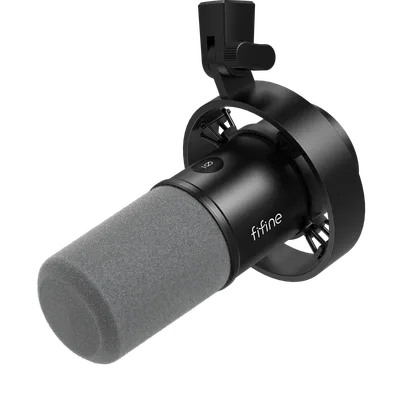
A dynamic USB/XLR combo mic with on-body gain and tap-to-mute - the smartest budget buy for anyone talking two feet from a loud keyboard.
The catch: Dynamic mics want you close - within a fist's distance of your mouth. Budget $15-20 for a boom arm and it disappears into your setup.
The step-up for podcasts and on-camera: FIFINE TANK6
If the K688 is the smart buy, the TANK6 is the "I want this to be the last mic I think about" buy. The bigger capsule gives your voice more body - the low-end warmth that makes a voice sound expensive instead of merely clear - and the chassis reads as broadcast gear rather than a gamer accessory, which starts to matter the second a webcam is pointed at your desk.
It has crept to about $115 as of mid-September, so it is the one pick here that breaks the $100 line, but it still does the USB-now, XLR-later trick, so you are not paying for that flexibility twice. The honest read: its edge over the K688 is tone and on-camera presence, not noise rejection, which is a wash between the two. Reach for it if you host a podcast, sit on stream with your face in frame, or simply want the most polished voice you can get without spending real money. For pure "stop sounding bad in Discord," the cheaper mic already won.
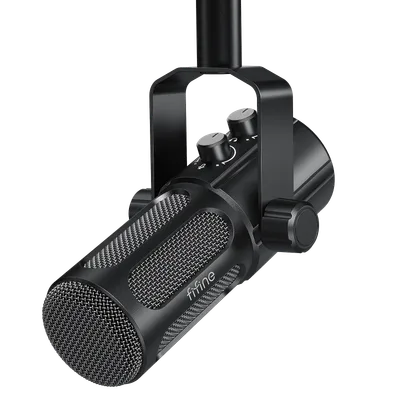
A larger dynamic capsule with a broadcast look - the pick if you are on camera or chasing podcast-grade tone, the one pick here that has drifted past $100, with the same USB/XLR flexibility.
The catch: Genuine overkill if you only ever talk on Discord - the K688 already clears that bar. Pay the extra ~$45 for the tone and the looks, not for noise rejection, which is a wash between the two.
The plug-and-play pick for quiet rooms: HyperX SoloCast
Sometimes you don't want a project, you want a mic that works the instant it's plugged in - and the SoloCast is that mic. We already recommend it in our setup accessories guide and it keeps earning the slot: sixty dollars, USB, tap the top to mute, nothing to learn and nothing to configure. For a quiet home office or a podcast corner, it sounds genuinely great and gets out of your way.
The honest asterisk is that it's a condenser, so it hears more of your room than a dynamic does. Next to a loud keyboard and a wall of fans it will pick up the ambience the K688 would have ignored - which is why, for eight dollars more, we usually nudge people toward the K688 instead. Buy the SoloCast if your room is already quiet and you value "plug in and forget" over squeezing out the last bit of noise rejection.
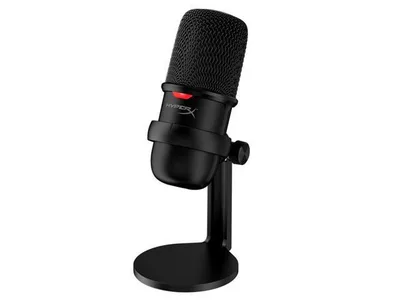
The no-fuss USB condenser: mute-by-tap, zero setup, great in a quiet room and the wrong call in a noisy one.
The catch: It's a condenser, so a loud room leaks in, and there's no XLR path when you outgrow USB. Great for quiet spaces, the wrong tool for a noisy battlestation.
The control surface nobody budgets for
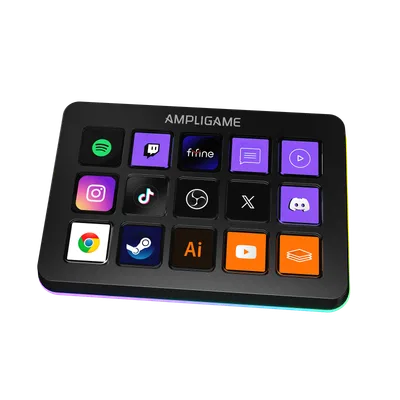
Your mic makes you sound better; a control surface makes you look like you know what you're doing on stream. If your headset mic is honestly fine but your stream needs one-tap scene switches and mutes, this is where the money goes instead of a mic.
If $60 is still too much
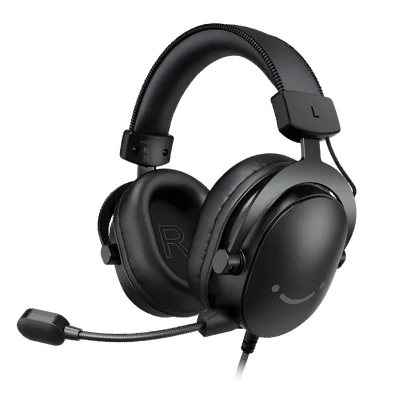
A desk mic beats any headset boom mic every time - but if the budget genuinely isn't there yet, an all-in-one headset with a passable mic is a reasonable stopgap. Just know you are buying the compromise on purpose.
How to choose (and what to skip)
- Dynamic in a loud room, condenser only if it's quiet. This is the whole ballgame. A dynamic mic rejects the keyboard and fans that a condenser broadcasts. Pick the capsule for your actual room, not for the streamer you watch in a treated studio.
- Distance beats price. Any mic within four inches of your mouth beats a better mic at arm's length. Budget $15-25 for a boom arm before you budget for a nicer capsule.
- USB/XLR combos are the smart budget play. You are not locked out of the interface-and-mixer world later, so you buy the mic once and grow into it.
- Watch your gain, not just your mic. Set gain so your normal voice peaks around -12dB. The number one cause of "budget mic sounds bad" is clipping, not the capsule.
- Skip the glowing "streamer bundle" condensers. The pretty ones with the shock mount and the RGB ring are almost always condensers that will drown your voice in room noise. The looks are not the point.
The bottom line
You do not need an XLR rig, a treated room, or a $300 mic to stop sounding bad online. You need a dynamic capsule close to your face over USB, and in 2026 that is a solved problem for about $68. Get the FIFINE K688 and a cheap boom arm and you clear the bar that most gamers never do. Step up to the TANK6 only if you are on camera or chasing podcast polish, drop to the SoloCast only if your room is genuinely quiet, and buy the H9 headset only if the desk-mic budget truly isn't there yet. Whatever you pick, get it close, set your gain, and your party chat will hear the difference on the first call.
Related reading
- Best gaming headset of the month - game audio and comms in one device, done properly
- Best gaming setup accessories 2026 - the rest of the desk: light bar, cable tray, speakers
Found this useful? Pass it along:
Frequently Asked Questions
Do I need an XLR microphone to sound good on Discord or Twitch?
No. A $60-90 USB dynamic mic gets you 90% of the way to broadcast sound with zero extra gear. XLR matters when you add an audio interface and start treating audio as a hobby - which is why the smart budget buys are USB/XLR combo mics that let you upgrade later without rebuying.
Dynamic or condenser mic for a gaming room?
Dynamic, almost every time. Condensers pick up everything - keyboard, PC fans, the neighbor's dog. A dynamic mic rejects the room and captures your voice, which is exactly what you want two feet from a mechanical keyboard.