8GB of VRAM in 2026: We Counted Every Card We Track
Some links in this guide are affiliate links - we may earn a commission at no extra cost to you.
Every VRAM argument on the internet is somebody's opinion about a game they play. So we did something duller and more useful: we counted.
Here is the video memory on every current-generation graphics card in our catalog, grouped by what it costs.
The count
| Price bracket | Cards with 8GB or less | Cards with 12GB or more |
|---|---|---|
| Under $300 | 6 | 1 |
| $300 to $500 | 2 | 6 |
| $500 to $800 | 0 | 7 |
| $800 and up | 0 | 5 |
Read that middle row again, because that is where the line sits.
Below $300, 8GB is still the default. Between $300 and $500 it flips hard. Above $500, not a single current card we track ships 8GB. Nobody announced this. The market simply moved, and it moved at roughly $400.
The 8GB cards still being sold new, by price:
| Card | VRAM | Price | Our score |
|---|---|---|---|
| RTX 5060 | 8GB | ~$410 last seen (list $349.99, no live listing) | 64 |
| RTX 4060 Ti | 8GB | ~$345 where still listed | 65 |
| RTX 5050 | 8GB | ~$290 | 45 |
| RX 9060 | 8GB | ~$279 last seen | 54 |
| RTX 4060 | 8GB | ~$269 where still listed | 58 |
| RTX 3050 | 6GB | ~$260 | 33 |
| RX 7600 | 8GB | ~$240 | 52 |
| Arc A580 | 8GB | ~$200 | 37 |
What running out actually does
This is the part that makes VRAM different from every other spec, and it is why the conversation gets so heated.
Run short on compute and performance degrades smoothly. Frames take a bit longer, the frame rate slides down, everything stays even.
Run short on video memory and nothing degrades smoothly. The card has to fetch texture data it does not have room for across the PCIe bus from system RAM, and that fetch is orders of magnitude slower than reading from the card's own memory. The frame that needs the missing texture arrives late. Sometimes very late.
So VRAM starvation does not show up as "lower FPS". It shows up as:
- Frame time spikes when you turn to look at something new
- Texture pop-in, where surfaces load in blurry and sharpen a beat later
- A collapsing 1% low while your average frame rate looks almost untouched
That last one matters more than anything else here. An average FPS counter is close to blind to this failure, which is exactly why benchmark charts and lived experience disagree so often on 8GB cards. We wrote the full explanation of why averages hide this in what 1% lows actually measure.
Where the line sits by resolution
Being specific rather than dramatic:
1080p: 8GB is genuinely fine for most games today, provided you are willing to drop textures from Ultra to High in the heaviest titles. That setting costs you very little visually and nothing in frame rate.
1440p: 12GB is the comfortable floor on a new card. 8GB works in plenty of games and will make you manage settings in others. If you are buying now and keeping it three years, this is where the decision gets real.
4K: 16GB. Not because every game needs it, but because the cards fast enough for 4K all have it anyway, so the question resolves itself.
VRAM per card, mid-range market as we write (cheapest in-stock listing on our feed)
The article's whole argument in one picture: the cheapest 16GB card costs ~$175 more than the fastest 8GB card (the 4060 Ti figure is a last-seen price, not a live listing). That gap is the price of not thinking about texture budgets again until you replace the machine.
The trade, in one comparison
Our own catalog contains the cleanest example of the dilemma:
- RTX 4060 Ti 8GB: scores 65, about $345 where still listed
- RX 9060 XT 16GB: scores 62, about $520
The 8GB card is faster today and cheaper. Straightforward win on a benchmark chart.
Now hold both for three years. The faster card's advantage stays roughly where it is, because raw compute does not decay. The memory gap gets worse, because texture budgets in new releases only go one direction. At some point the 62-scoring card is the one still holding High textures without hitching.
Our opinion, stated plainly: above $300, buy the memory. Below $300, buy the speed, because at that tier you are turning settings down regardless and 8GB is the honest ceiling of what the price supports.
If you land on the buy-the-memory side of that line, the two 16GB cards doing the work in 2026 builds - exact cheapest in-stock listings from our variant feed, prices approximate:
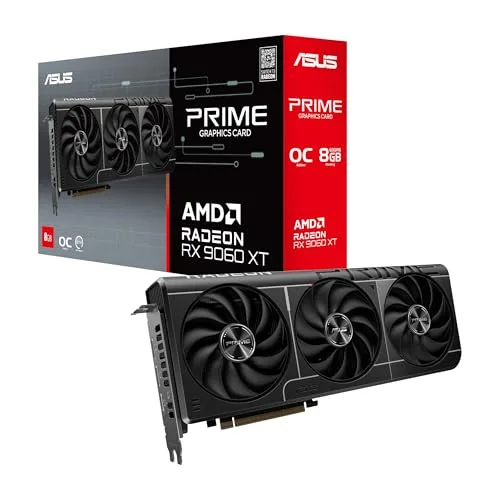
The cheapest 16GB card
ASRock RX 9060 XT Challenger 16GB OC
The card from the comparison above, at the exact listing our feed tracks. Slightly slower than the 8GB NVIDIA option today, holding High textures long after it - which is the entire argument of this article in one product.
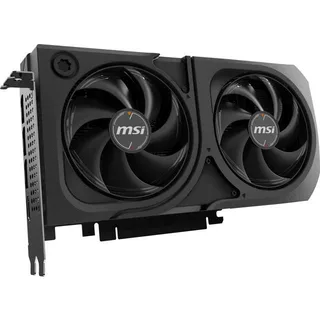
The NVIDIA route to 16GB
ASUS Dual RTX 5060 Ti 16GB OC
Same memory hedge with NVIDIA's feature stack on top. The honest catch is the shortage premium: 16GB versions of this card are running near double the launch sticker right now, and our tracker shows only one live listing, at ~$830 - a scarcity ask, not a price to chase.
Where we would push back on ourselves
Two honest caveats, because the 8GB discourse is full of people who have never seen the failure they are describing.
The panic is overstated for 1080p players. A 1080p 60Hz user playing the games most people actually play is not running into a memory wall in 2026. The "8GB is dead" framing largely comes from 1440p and 4K testing at maximum settings, which is a real scenario for some readers and not the median one.
We cannot tell you your games. Our count describes the market, not your library. A competitive shooter player at 1080p and a modded single-player enthusiast at 1440p will get opposite answers from the same card. The count tells you what the industry decided. It does not tell you what you need.
How to check your own before you buy
Two minutes, no cost:
- Run your current card's memory usage in a game you already play. MSI Afterburner shows both allocated and actually used VRAM. Allocated is always higher and is not the number that matters.
- If you are already hitting your ceiling, you will see it in frame time spikes when you rotate the camera in a dense area, not in your average.
- Then check the card you are considering on its own page for what board partners are actually charging: RX 9060 XT, RTX 5060 Ti, RX 9070.
If you want to see whether the card is even matched to your processor before you spend, that is what our bottleneck calculator is for.
Related reading
Found this useful? Pass it along:
Frequently Asked Questions
Is 8GB of VRAM enough in 2026?
At 1080p with sensible settings, usually yes. At 1440p it depends on the game and how high you push textures. What has changed is the market: of the current cards we track under $300, eight of nine ship 8GB or less, while above $500 not a single one does. The industry has drawn its own line at roughly the $400 mark.
What happens when a game runs out of VRAM?
It does not usually crash. It starts swapping texture data across the PCIe bus from system memory, and that swap takes far longer than a normal frame. The result is stutter rather than a lower frame rate, which is why VRAM problems hide from average FPS counters and show up in 1% lows.
How much VRAM do I need for 1440p?
12GB is the comfortable floor for new cards at 1440p, and 16GB is what you buy if you want to keep textures high for several years. 8GB will run most 1440p games today if you accept turning texture quality down, which is the setting with the biggest visual impact and almost no frame rate cost when you have the memory for it.
Is 8GB or 16GB better if the 8GB card is faster?
It depends on how long you keep it. A faster 8GB card wins benchmarks today. A slower 16GB card ages better, because texture memory requirements only go up and you cannot add more later. In our own catalog the RTX 4060 Ti 8GB scores 65 at about $345 where it is still listed and the RX 9060 XT 16GB scores 62 at about $520, which is the trade in a single line.
Does VRAM affect FPS?
Only when you run out. Below the limit, extra video memory does nothing for frame rate at all. Above it, performance does not degrade gracefully - you get frame time spikes and texture pop-in rather than a smooth slide downward.