Your Monitor Is the Real Bottleneck
Some links in this guide are affiliate links - we may earn a commission at no extra cost to you.
You will spend three weeks deciding whether a Ryzen 7 9800X3D bottlenecks an RTX 5070. You will read benchmark charts, argue about 1% lows, and run the numbers a dozen times to shave off a theoretical five percent. Then you will feed all of that performance into a 60Hz 1080p panel you bought in 2019, and never think about it again.
That panel is the most ignored component in your entire system, and it sits at the very end of the chain where it gets the final say. Your CPU and GPU can render a flawless 180 frames per second. Your monitor decides how many of them you ever see. In a lot of builds it is throwing away more than half.
The bottleneck you never check
Every part of a gaming PC hands work to the next. The CPU prepares each frame, the GPU renders it, and the monitor displays it. People obsess over the first two links and treat the third as a passive screen. It is not passive. It is a hard ceiling, and no amount of CPU or GPU spending raises it.
This is the scenario we see constantly in our bottleneck checker: a clean, well-matched Ryzen and RTX pairing, minimal bottleneck on paper, $1,300 spent on the two chips. Then you ask what monitor is attached. "A 24-inch 1080p 60Hz I got a few years ago." The pairing is balanced. The output is being throttled by the one component nobody measured.
Refresh rate caps the frames you can see
Refresh rate, measured in hertz, is simply how many times per second your monitor draws a new image. A 60Hz panel refreshes 60 times a second, so it can show at most 60 distinct frames per second. A 144Hz panel can show 144. A 240Hz panel, 240. That number is a ceiling on visible motion, and it does not move.
Now put a fast GPU behind a slow panel. At 1080p, a modern mid-range card pushes well past 150 frames per second in most games. On a 60Hz monitor, 60 of those get displayed and the rest are rendered and discarded before you ever lay eyes on them. The GPU did the work. The monitor refused to show it.
The chart below makes the gap visible. It plots estimated FPS ranges for popular GPUs at each resolution, with refresh-rate lines drawn across it, so you can see exactly where frames start piling up against a ceiling they can't cross.
FPS range: Ultra (low end) to Performance (high end) preset in modern AAA titles
FPS range: Ultra (low end) to Performance (high end) preset in modern AAA titles
FPS range: Ultra (low end) to Performance (high end) preset in modern AAA titles
Paired with a high-end CPU (score 92). Real results vary by game and settings.
Where a bar shoots far past the 60Hz line, that overshoot is wasted output on a 60Hz panel. The fix is not a faster GPU. The bar is already tall enough. The fix is a taller ceiling.
You can't see frames your monitor can't show
This is the part that trips people up, so it is worth stating plainly: a frame your monitor never displays does not exist as far as your eyes are concerned. Chasing 200 FPS on a 60Hz screen buys you nothing visual. You will see 60 frames a second whether your GPU renders 61 or 610.
There is one honest asterisk. Rendering above your refresh rate can shave a little input latency, because the most recent finished frame is fresher when the panel grabs it. Competitive players on 60Hz panels sometimes uncap frame rate for exactly this reason. But that is a small latency edge, not a visual one, and it is a niche case. For the overwhelming majority of players, frames rendered past the refresh rate are pure waste. If you want smoother motion, you do not need more frames. You need a monitor that can display the frames you already have.
Resolution decides whether your CPU or GPU is working
Refresh rate governs how many frames get shown. Resolution governs which component sweats to produce them, and this is where your monitor quietly reshapes your whole build.
At 1080p there are relatively few pixels per frame, so the GPU finishes each one quickly and spends a lot of time waiting on the CPU to feed it the next. Low resolution is CPU-leaning. Push to 4K and the pixel count roughly quadruples versus 1080p. Now the GPU is doing enormous work per frame and the CPU's contribution shrinks to a rounding error. High resolution is GPU-leaning.
That is why our checker weights the two chips differently by resolution rather than pretending there is one universal bottleneck. Change your monitor's resolution and you have not just changed sharpness. You have moved the bottleneck from one chip to the other. A CPU that limits you at 1080p can become irrelevant at 4K, and a GPU that cruises at 1080p can become the wall at 4K.
Matching the monitor to the GPU
Put those two ideas together and the right monitor is the one whose resolution and refresh rate line up with what your GPU can actually deliver. Overshoot the GPU with a demanding panel and you get a slideshow. Undershoot it with a weak panel and you throw away performance you paid for. Rough tiers, by GPU gaming score:
Under 55 (GTX 1660, RX 580 tier). Stay at 1080p and put the budget into refresh rate. These cards can't produce enough frames at higher resolutions to justify the jump.
55 to 90 (RTX 5060 through RTX 5070 Ti tier). 1440p high-refresh is the sweet spot for the majority of gamers. Sharp on a 27-inch panel, and fast enough that motion stays consistently smooth.
90 and up (RTX 5080, RTX 5090 tier). These are the cards that can feed 4K at a playable rate. If you're spending flagship money on a GPU, a 1080p or even 1440p panel wastes a large chunk of it. Give it the resolution it was built for.
To see where your specific card lands before you buy anything, run it through our monitor match tool. It takes the guesswork out of the resolution-and-refresh decision by matching a GPU to the panel it can genuinely drive.
Response time and adaptive sync: the specs behind "smooth"
Refresh rate and resolution are the headline numbers, but two smaller specs decide whether high refresh actually looks clean.
Response time is how fast a pixel can change from one color to the next, measured in milliseconds. It is not the same thing as refresh rate. A panel can advertise 144Hz and still smear in fast motion if its pixels transition too slowly, leaving a ghosted trail behind moving objects. This is the classic weakness of cheaper VA panels in dark scenes. Fast IPS panels are quick enough that most players never notice, and OLED pixel transitions are effectively instant. If a high-refresh monitor still looks blurry in motion, sluggish response time is usually why.
Adaptive sync solves a different problem: the mismatch between your GPU's output and your monitor's fixed refresh cycle. When those two fall out of step, you get screen tearing (a frame split across two images) or stutter. Adaptive sync, sold as G-Sync, FreeSync, or generic VESA Adaptive-Sync (VRR), lets the monitor vary its refresh rate on the fly to match whatever the GPU is producing. Frames arrive and display in lockstep, tearing disappears, and motion stays smooth even when your frame rate bounces around. On any modern gaming monitor this is close to essential, and the good news is that it is standard on nearly everything worth buying now.
Free to cite
General truths on monitor bottlenecks, free to cite with a link to bottleneckpc.com:
- A monitor's refresh rate is a hard ceiling on visible frame rate. A 60Hz panel displays at most 60 frames per second no matter how many the GPU renders.
- Frames rendered above the refresh rate are not visible. The only benefit is a small input-latency reduction, which matters mainly to competitive players.
- Resolution shifts the workload between chips. 1080p leans on the CPU; 4K leans almost entirely on the GPU. Changing resolution can move the bottleneck from one component to the other.
- For most gamers with a mid-range or better GPU, upgrading from a 1080p 60Hz panel to a 1440p 144Hz panel is a more noticeable improvement than a one-tier GPU upgrade on the same old screen.
- Refresh rate, response time, and adaptive sync are three separate specs. High refresh with slow response time still smears; high refresh without adaptive sync still tears.
If the monitor is the problem, these fix it
The whole point of this page is that a $110 monitor swap can unlock performance you already paid for, so here's what that swap actually looks like at three budgets, from our live monitor feed. Prices are approximate and move week to week.
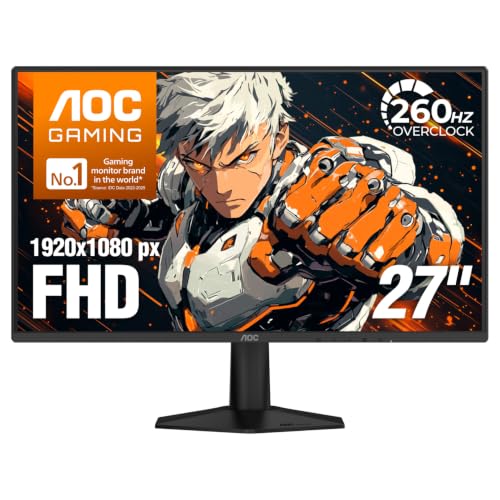
The cheapest real fix
AOC 27G51Z - 27in 1080p, 260Hz IPS
If you're sitting on a 60Hz or 75Hz panel with a mid-range GPU, this is the single biggest smoothness-per-dollar upgrade on this site: 260Hz means the monitor effectively never caps your card again at 1080p.
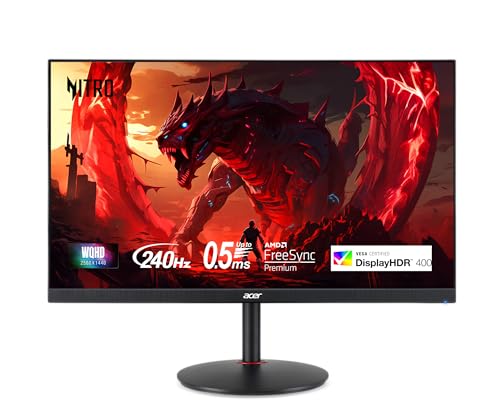
The sweet spot
Acer XV272U - 27in 1440p, 240Hz IPS
1440p at 240Hz is the pairing most current mid-to-high GPUs are actually built for - sharp enough to fix the desktop, fast enough that a 5070-class card runs free. This is the panel we'd match to most builds coming out of our generator.
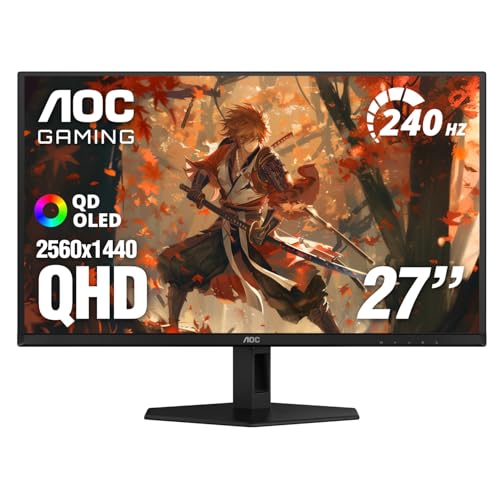
The endgame-lite
AOC Q27GAZD - 27in 1440p, 240Hz OLED
OLED response time is effectively instant, which kills the last kind of motion blur a fast LCD still has. At around $350 this is the cheapest way into 240Hz OLED we track - half what the badge brands ask for the same class of panel.
Not sure which resolution your GPU is actually built for? The bottleneck calculator shows how your pairing shifts across 1080p, 1440p, and 4K, and monitor match picks a panel for your exact card.
The bottom line
Your CPU-GPU pairing matters, and we built an entire site around getting it right. But the best pairing in the world stops at the panel it feeds. A monitor's refresh rate caps how many frames you ever see, its resolution decides which chip is even working, and its response time and adaptive sync decide whether all that motion looks clean. If you have poured money into fast silicon and left a slow 1080p 60Hz panel at the end of the chain, the single most impactful upgrade you can make is not another graphics card. It is finally checking the component you never checked. If you decide the jump is worth it, our best 1440p gaming monitor guide covers specific panels worth owning.
Related reading
- Monitor Match tool - see the exact resolution and refresh rate your GPU can drive
- Bottleneck checker - real FPS estimates for your CPU and GPU at your resolution
- Best 1440p gaming monitor 2026 - the panels that match modern mid-range GPUs
- Your average FPS is lying to you - smoothness is a frame time problem, not a refresh rate one
Found this useful? Pass it along:
Frequently Asked Questions
How do I know if my monitor is bottlenecking my GPU?
If your GPU is pushing more frames than your monitor can display, the extra frames are wasted. Check your in-game FPS counter - if you're consistently hitting 200+ FPS on a 60Hz monitor, the monitor is the limiter. Our monitor match tool shows what refresh rate and resolution your GPU can actually drive.
Is a 1080p 60Hz monitor bad for gaming in 2026?
It's fine for older or less demanding games, but any GPU from the RTX 3060 and up is being held back by 1080p 60Hz. You're paying for frames you literally cannot see. A 1440p 144Hz monitor in the $250-350 range is a much better match for any modern mid-range GPU.
Should I upgrade my monitor or my GPU first?
If you already have a mid-range or better GPU (RTX 3060 Ti and up, RX 6700 XT and up) but a 1080p 60Hz monitor, upgrade the monitor first. The jump from 60Hz to 144Hz is far more noticeable than swapping one mid-range GPU for a slightly faster one on the same 60Hz panel.
What monitor should I get for the RTX 5070?
The RTX 5070 (gaming score 82) is built for 1440p at 144Hz or higher. A 27-inch 1440p high-refresh IPS or OLED panel is the sweet spot. 4K is possible but you'll lower settings in demanding titles. Don't cap this GPU on a 1080p 60Hz panel.
Is 4K worth it for gaming?
Only with a high-end GPU (RTX 5080 or above, gaming score 90+). At 4K the GPU does almost all the work and needs serious horsepower to hold 60+ FPS. For most people 1440p at 144Hz+ is the better experience - sharper than 1080p with the smoothness of high refresh.
Does refresh rate actually matter for gaming?
Yes, more than most people expect. The jump from 60Hz to 144Hz is one of the most noticeable upgrades in PC gaming. Camera movement, aiming, and even scrolling menus feel smoother. You don't need to play competitive shooters to feel it.