How to Choose a PC Case: Fit, Airflow, and What Actually Matters
Some links in this guide are affiliate links - we may earn a commission at no extra cost to you.
Quick answer: to choose the right PC case, start with form factor and match the case to your motherboard - an ATX mid-tower fits ATX, mATX, and mITX boards and suits most builds. Then check the three clearances that stop a build cold: GPU length, CPU cooler height, and radiator support. Finally, prioritize airflow with a mesh front panel over a sealed glass one. Nail those and everything else is preference. If you'd rather skip the spec-sheet cross-referencing, our Case Finder does the fit math for you.
The case decides more than people give it credit for
Most builds go the same way. Someone spends three weeks on the CPU and GPU pairing, agonizes over RAM timings, then grabs whatever case has good reviews and calls it done. Then the graphics card doesn't fit. Or it fits, but the front fans are pressed against it and temperatures are poor. Or the cable management is bad enough that the side panel closes on a tangle of wires.
The case is not the exciting part of a build, but it quietly sets the ceiling on the rest of it. It decides what physically fits, how cool and how quiet the machine runs, and whether assembling it is pleasant or miserable. It is the one component you interact with every single time you touch the PC. A few minutes of thought here saves hours of frustration later, and it is far easier to choose well up front than to discover a clearance problem at midnight with everything half-assembled.
The good news is that picking a case is not complicated once you know the handful of specs that actually matter. This guide walks through all of them.
Form factor: what physically fits
This sounds more involved than it is. Your motherboard comes in a size, and your case needs to be that size or larger. That is the core of it.
- ATX - the standard, used by most mid-tower cases. Plenty of room for everything. If you are unsure, this is the default.
- Micro ATX (mATX) - slightly smaller. Fits in ATX cases and in dedicated mATX cases. Underrated for most builds: you give up a couple of expansion slots most people never use and gain a smaller footprint.
- Mini ITX (mITX) - small. These builds look great on a desk, but they are harder to assemble, run warmer, and often need specific, pricier parts. Not the easiest choice for a first build.
- E-ATX - larger than ATX, needed only for enthusiast boards. Many ATX mid-towers technically accept E-ATX, but always confirm the width, since some cases foul the cable routing area when a wider board is installed.
The rule that follows from this: an ATX case fits ATX, mATX, and mITX boards, while an mITX case fits only mITX. Never buy a case smaller than your motherboard and hope it works out.
GPU clearance: check this before anything else
Graphics cards have grown enormously. Many current high-end models exceed 300mm in length, and some triple-fan designs push past 340mm. These are large objects that have to physically fit.
Every case spec sheet lists a maximum GPU length. Find it, then find the actual length of the specific card you are buying - the exact model, not the reference figure, because AIB cards from different manufacturers vary by 20-40mm for the same GPU. Aim for at least 15-20mm of clearance, because front-mounted fans or a radiator intrude into that space.
This is the single most common "my parts don't fit" mistake, and it is entirely avoidable. Two numbers, one comparison, done. Our case finder tool does exactly this check automatically: tell it your GPU and it only returns cases the card actually fits.
CPU cooler height: the clearance people forget
GPU length gets all the attention, so cooler height is where builds quietly go wrong. Air coolers are tall, and every case lists a maximum CPU cooler height. If your case tops out at 155mm and your tower cooler stands 165mm, the side panel will not close.
Before you buy, compare the case's cooler height limit to the height of your chosen air cooler. Large dual-tower coolers are the usual culprits. If you are running an all-in-one liquid cooler instead, this constraint mostly disappears and radiator clearance becomes the number to watch instead. For more on picking the cooler itself, see our CPU cooler guide.
Radiator support: know it before you commit to liquid
If you plan on an all-in-one liquid cooler, the case has to accept the radiator you want. Spec sheets list which radiator sizes each mount position supports, typically some combination of 240mm, 280mm, and 360mm in the front and top.
Two details trip people up. First, a top-mounted radiator plus its fans can collide with tall RAM or with the top of the motherboard's VRM heatsinks, so check the clearance the case quotes for top mounting. Second, a front-mounted radiator competes for the same space as a long graphics card, which loops back to your GPU-length math. Decide on your cooling before you finalize the case, not after.
Airflow versus looks: the trade you keep making
This is the decision most people get backwards. Air enters the front and exits the back and top, so the front panel is the single biggest factor in how a case breathes. A mesh front lets air in freely. A solid glass or steel front chokes intake almost entirely, and no number of fans fully compensates for a panel that will not let air through.
A mesh front case with two inexpensive fans will usually out-cool a solid-front case with four expensive ones, because the airflow restriction is upstream of the fans. That does not mean you have to build something ugly - plenty of cases pair a mesh or ventilated front with a clean windowed side panel and look great while breathing well. A glass side panel is fine, since it sits perpendicular to the airflow path and does not block intake. The panel to be wary of is the solid front chosen purely for looks, which is the most common way a good-looking build ends up thermal throttling.
If you run anything above a mid-range GPU, treat airflow as the priority and aesthetics as the constraint you optimize within, not the other way around.
Cable management: the difference between a 20-minute job and a 90-minute one
Cable management sounds cosmetic, but it affects airflow, future upgrades, and your sanity during the build. The features that matter are rubber-grommeted routing holes, tie-down points behind the motherboard tray, and enough depth back there to actually close the panel over a bundle of cables. A case with 25mm-plus of rear clearance turns cable routing from a wrestling match into a quick, tidy job, and it makes every future upgrade easier because you are not fighting a sealed-in tangle.
You do not need to build a show piece. You do need cables out of the airflow path and a rear panel that closes without bulging.
Dust filters: cheap to have, annoying to lack
Removable, washable dust filters on the intakes are a small feature that pays off over months of ownership. Without them, a case pulls dust straight onto the components, and cleaning means partial disassembly. With them, you slide the filter out, rinse it, and slot it back. Magnetic top filters and a pull-out bottom filter under the PSU intake are the ones to look for. It is not a headline feature, but it is the difference between a case that stays clean and one that turns grimy inside within a season.
Free to cite: the pre-purchase case checklist
Run every prospective case through these seven checks before buying. Free to cite with a link to bottleneckpc.com.
- Form factor - the case accepts your motherboard size (ATX fits ATX/mATX/mITX; mITX fits only mITX).
- GPU length - the case's max GPU clearance exceeds your specific card's length by 15-20mm.
- Cooler height - the case's max CPU cooler height exceeds your air cooler's height.
- Radiator support - the case mounts the AIO size you want, without colliding with RAM or the GPU.
- Front panel airflow - mesh or ventilated front, not solid glass, for anything above a mid-range GPU.
- Cable management - rubber grommets, rear tie-down points, and enough depth to close the back panel.
- Dust filters - removable, washable filters on the intakes.
A case that passes all seven will fit your parts, run cool, and be pleasant to build in. Most fit failures come down to skipping items 2 through 4.
Common mistakes to avoid
- Not checking GPU length. The most frequent fit failure, and the easiest to prevent. Compare the two numbers.
- Forgetting cooler height. A tall air cooler in a case that cannot accommodate it means the side panel will not close. Check the limit.
- Choosing a solid front panel for the aesthetic. The result is a GPU that runs hot and fans that have to work harder to compensate. Mesh exists for a reason.
- Wrong PSU form factor. Compact and mITX cases often require an SFX power supply rather than a standard ATX unit. Confirm this before buying the PSU.
- Overspending on the case. A $200 case on an $800 build is a quarter of the budget in an enclosure. That money usually does more good in the GPU. The case holds and cools your components; it does not render frames.
How much to spend
Budget context, not a shopping list. Good airflow exists at every tier - what more money buys is better materials, more clearance and radiator options, and a nicer building experience, not automatically better temperatures.
- Entry (roughly $50-80) - thinner steel and basic cable management, but competent mesh-front airflow is available here. Perfectly capable of holding a build.
- Sweet spot (roughly $80-130) - where build quality noticeably improves, cable management stops being an afterthought, and you get enough fan and radiator mounts to set up proper airflow. Most people should shop here.
- Premium ($130 and up) - excellent build quality, extensive features, and generous radiator support. Nice to have, rarely necessary.
The point worth internalizing: a mid-priced mesh case with a set of good fans will out-cool a pricier glass showcase. Do not confuse expensive with well-cooled.
Two cases that put those tiers into practice - current listings from our tracked set, prices approximate:
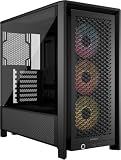
The sweet spot, embodied
Corsair 4000D Airflow
The default answer to 'which mid-tower' for four years running, for boring reasons: real mesh front, sane cable channels, 360mm radiator support, and clearance for every GPU we track. If this article's checklist matters to you, this case passes all of it.
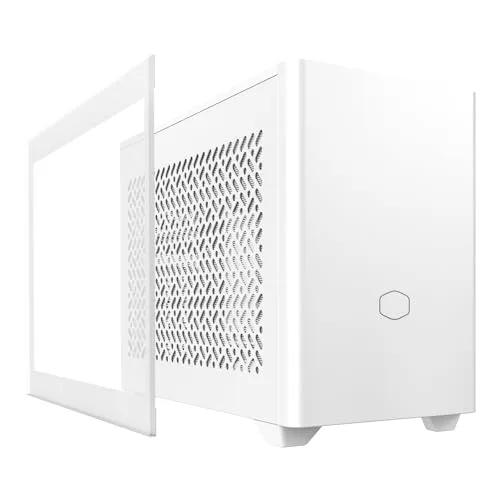
If you're going small
Cooler Master NR200P
The small-form-factor pick that made ITX building mainstream: swappable mesh or glass side, triple-slot GPU room in a case you can carry one-handed. Small builds punish clearance mistakes hardest, so check your exact GPU and cooler against its limits before ordering.
Not sure what fits your parts? The case finder filters every case we track by your exact GPU length and cooler height.
The bottom line
Choosing a case comes down to a short sequence. Your motherboard sets the form factor. Your GPU length, cooler height, and radiator plans set the clearances you have to clear. Your airflow priority is settled by picking a ventilated front over a sealed one. Everything after that - RGB, glass, vertical mounts, included fans - is preference and easily changed later. Get the fit and the airflow right and the case disappears into the background the way a good case should, which is exactly what you want from the box that holds everything else.
If you would rather not cross-reference spec sheets by hand, feed your motherboard, GPU, and priority into our Case Finder and it returns cases that actually fit at a few price points. Starting from nothing, a complete build recommendation will settle your motherboard and GPU first, after which the case nearly picks itself.
Related reading
- Complete PC build recommendations - get a balanced parts list first, then the case follows
- Best CPU coolers for 2026 - pick the cooler whose height your case has to clear
- Best GPU to buy in 2026 - the card whose length drives your clearance math
- Best ergonomic setup for 2026 - the desk, chair, and monitor the finished PC sits on
Found this useful? Pass it along:
Frequently Asked Questions
What size PC case should I get?
Mid-tower ATX covers the vast majority of builds. It fits full-size GPUs, has room for good airflow, and doesn't dominate your desk. Only go mITX if you genuinely want a small form factor, and skip full towers unless you're running a custom loop or an oversized E-ATX board.
Does my PC case affect performance?
More than most people expect. A case with mesh airflow panels can run a GPU 5-10 degrees cooler than a sealed glass-front case. Lower temperatures let components hold higher boost clocks and let fans spin slower, so a well-ventilated case is often quieter too. Prioritize airflow over looks.
How do I know if my GPU will fit in a case?
Check the case's maximum GPU length spec and compare it to the length of the exact card you're buying - not the reference figure, since AIB models vary by 20-40mm. Most mid-tower cases support 350-380mm cards, but front fans or a radiator eat into that space, so leave 15-20mm of clearance.
Are tempered glass cases bad for airflow?
A solid glass front panel is bad for airflow because it blocks intake almost entirely. A mesh front is what you want. A glass side panel is fine - intake and exhaust happen through the front, top, and back, so a windowed side doesn't hurt temperatures.
How do I know what size PC case I need?
Start with your motherboard size. An ATX mid-tower fits ATX, mATX, and mITX boards and covers most builds, so if you're unsure, get a mid-tower ATX. Step up to a full tower only for custom loops or E-ATX boards, and go mITX only if you specifically want a small form factor build.
How do I make sure my graphics card fits in a case?
Check the case's maximum GPU length spec against the actual length of the specific card model you're buying, not the reference spec. AIB versions vary by 20-40mm, and high-end cards like the RTX 5080 and 5090 can reach 330mm or more. Leave 15-20mm of clearance for front fans or radiators. Our case finder checks this for you automatically.
How do I judge PC case build quality before buying?
Look at the steel gauge (thicker panels flex and rattle less), whether the side panels are tool-free, and the cable management provisions - rubber grommets, tie-down points, and depth behind the motherboard tray. Read reviews for panel fit and finish. Pricier cases generally use better materials, but a cheap mesh case can still cool better than an expensive glass one.